Make sure every inquiry has a next step
A customer fills out a form after hours. Another asks for an estimate and hears back once, then the conversation stops. Someone books an appointment and calls the next day to confirm what they need to bring. Each of those situations gives your business a chance to respond clearly without asking your team to remember every detail for every customer.
Island Web Studios helps businesses connect email, website forms, chat, booking, and customer records. We can use HighLevel to build workflows around what your team already does and improve the steps that are easy to miss. You might start with a confirmation email and a reliable handoff for new inquiries. You might need several workflows for quotes, scheduling, renewals, or customer follow-up.
Send email that fits what the customer just did
The message someone needs depends on where they are in the process. A new subscriber might benefit from a short introduction to your services. A prospect waiting for a quote wants an update on that request. A returning customer may need a reminder about an upcoming appointment or renewal.
We can write and build email campaigns around those situations. Common projects include welcome sequences, newsletters, quote follow-ups, appointment reminders, and campaigns for customers who are due to return. We’ll work with you to decide who gets each message, what triggers it, and when the sequence should stop. For example, when a customer books, the workflow can end the booking reminders and move them to appointment confirmations.
We can also help organize your contacts into groups that make sense for your business. Someone who subscribed to a newsletter may need different information from someone who requested an estimate last week. Where your data supports it, we can use service interest, booking status, or customer history to make those messages more relevant.
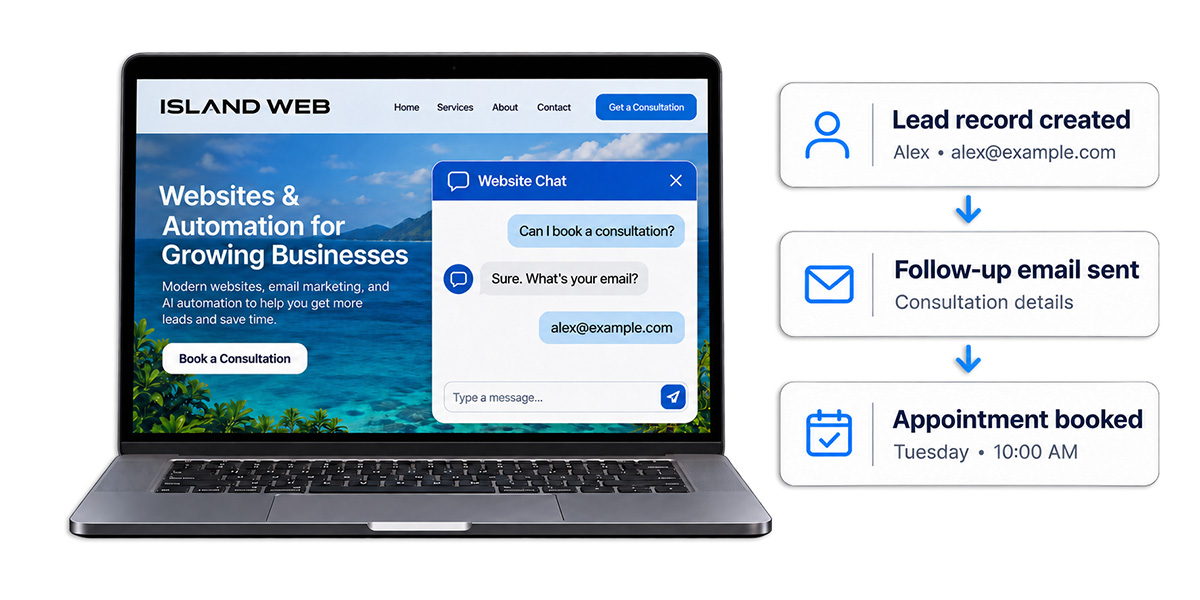
Give your AI chatbot a clear job
A website chatbot can help visitors find the right service, answer common questions, or collect information your team needs to respond. Its most useful work usually starts with a defined set of tasks. For example, it might answer questions about service areas and appointment availability, then ask for the details needed to send an inquiry to the right person.
We build around approved business information, including your services, hours, policies, and frequently asked questions. We work out which topics the chatbot can handle, what details it can ask for, and when to bring in a person. If pricing depends on a walkthrough or a technical review, the chatbot can explain what affects the estimate and help the visitor request one.
An AI agent can assist with a more involved workflow, such as gathering the scope of a project before sending the inquiry to the person who prepares proposals. We define which actions the system can take and how your team can see what it did. If a question falls outside the information you’ve approved, the customer should have a clear way to reach someone who can help.
Connect forms, bookings, and customer records
When a visitor submits a form, the work starts on your side. Someone needs to receive the inquiry, understand what was requested, and know whether to respond or hand it off. A CRM workflow can create or update a contact record, record where the lead came from, send a confirmation, and notify the right person.
The next steps can follow what the customer does. If they book, the workflow can send a confirmation and reminders. If the team sends a quote, it can schedule a follow-up. If the customer replies or the opportunity closes, the workflow can stop the scheduled reminders. This keeps automated messages in step with the actual conversation.
For example, an on-site service company might ask new leads for their location, service type, and preferred date. The workflow can attach those details to the inquiry and route it to the person who covers that area. The customer receives a confirmation explaining when to expect a response. If the team marks the appointment as booked, the customer gets the relevant preparation details.
Build around exceptions your team already handles
Real customer journeys have exceptions. A person may submit the same inquiry twice, reschedule an appointment, or reply through a different channel. A team member may already be speaking with a customer who receives an automated reminder. We account for the most common cases while setting up the workflow.
Before launch, we can run through examples with your team. We’ll check where inquiries arrive, who sees them, and what happens when a customer takes an alternate path. We can also test how reminders stop, whether contacts are updated correctly, and how a staff member takes over a conversation. Your team should be able to understand the workflow and see why a message was sent.
We can begin with the step that causes the most missed inquiries or repetitive work. Once your team is comfortable with that workflow, it’s easier to identify the next task worth automating.
Measure whether follow-up is improving
Email and automation should make it easier to see what happens after someone contacts you. We can help choose a few measurements tied to the problem you want to solve. If leads sit too long before a reply, response time is worth tracking. If appointments get missed, you may want to review show-up rates and reminder delivery. If you run paid campaigns, connecting lead sources with booked appointments can help you see which campaigns contribute to results. [Explore our paid digital advertising services.](/paid-advertising/)
We can also review email responses and booking activity to see which messages are doing their job. If customers keep asking the same question after a confirmation email, that email may need a clearer answer. If people start a chatbot conversation and leave when asked for too much information, we can review which questions are essential and which can wait until a member of your team follows up.
Frequently asked questions
Do we need to replace our website to use HighLevel?
In many cases, we can connect the website you already have through forms, chat, booking tools, or available integrations. We’ll review your setup and explain what connection makes sense for each workflow.
Can you work with our current CRM or email platform?
We can review the tools you already use and determine which systems can share the information the workflow needs. If your existing setup supports part of the process, we can use it where it fits.
Can the chatbot book appointments?
A chatbot can guide customers to an appointment calendar or help complete a booking when the workflow and integration support it. We’ll agree on what the chatbot can confirm and which requests need a person’s approval.
What if a customer wants to talk to someone?
We can build a handoff into the experience and decide where that request goes. The goal is for your team to receive enough context to pick up the conversation without asking the customer to start over.
Can we start with one automation?
Yes. A new inquiry confirmation, missed follow-up, or appointment reminder is often a manageable first project. We can build and test that workflow around the way your team already works.