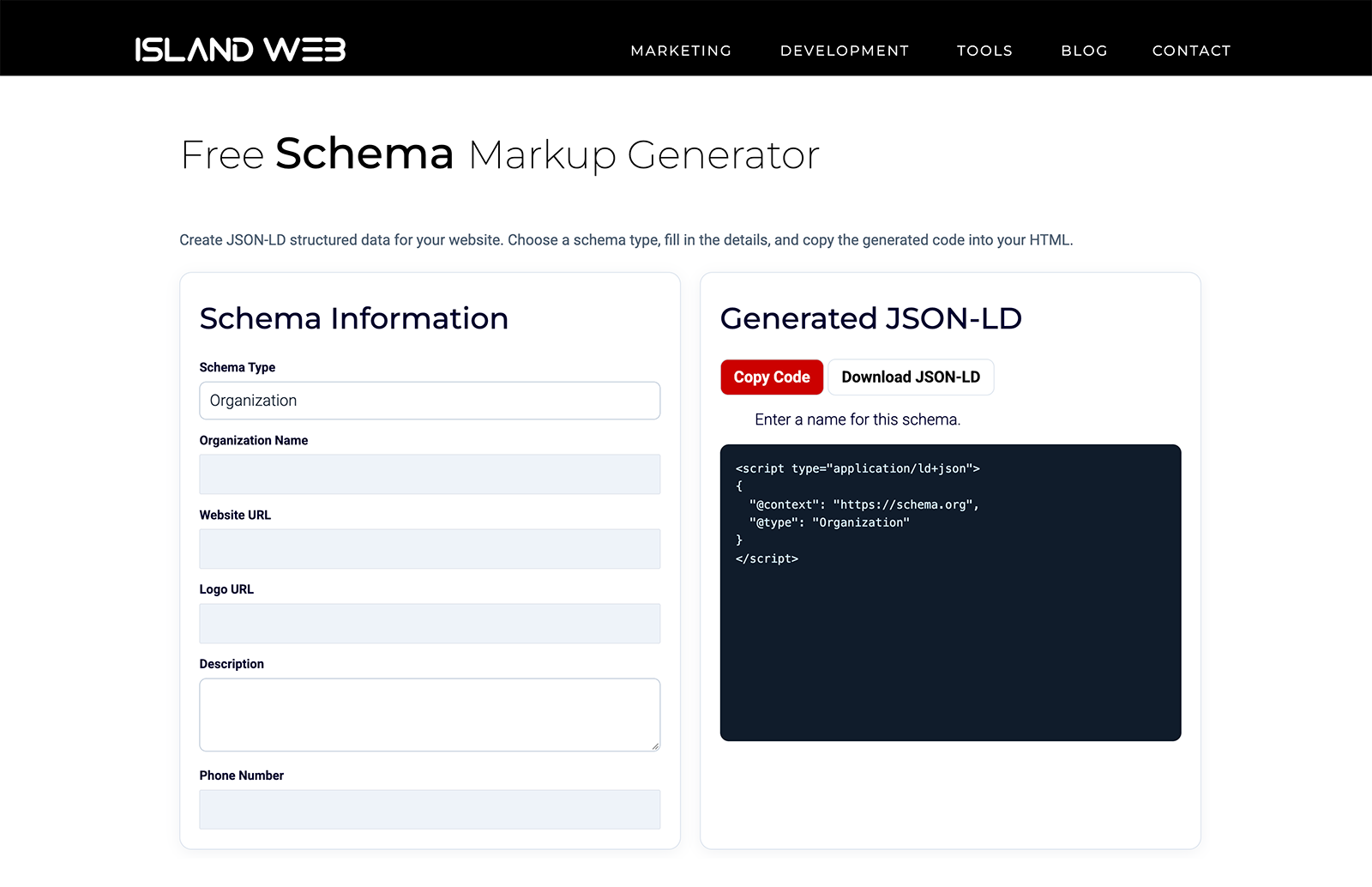
Create professional JSON-LD structured data with our free Schema Markup Generator and Graph Builder. Choose from 21 Schema.org types or start with one of eight page-specific templates to generate interconnected structured data for your website. Create individual schema entities, establish relationships between businesses, webpages, products, services, and other content, and export your generated code without manually writing complex JSON-LD markup.
Schema details
Generated JSON-LD
Validation warnings are suggestions, not a guarantee of rich-result eligibility. Test your published page with Google's Rich Results Test and Schema.org Validator.
How to Use the Schema Markup Generator
Our free Schema Markup Generator makes creating JSON-LD structured data simple, even if you have never written schema markup before. Follow these eight steps to create, review, and implement structured data for your website.
Step 1: Choose the Appropriate Schema Type
Select the schema type that accurately represents the content or primary entity described on your webpage.
For example, use Organization schema to describe your company, LocalBusiness for a business with local operations, Article for a blog post, or Product for an item offered for sale.
The Schema Markup Generator supports ten popular schema types, allowing you to create structured data for many different kinds of websites and content.
Step 2: Enter Your Website or Entity Information
Complete the available information fields using accurate, relevant details that correspond to your website content.
The available fields depend on the selected schema type. Business schema may require company information and contact details, while article schema may include a headline, author, description, and publication information.
Whenever possible, use complete HTTPS URLs for website addresses and images. Avoid entering placeholder information, fabricated reviews, or other details that do not accurately represent your content.
Step 3: Add Additional Items When Appropriate
For supported schema types containing multiple entries, use the Add Item button to include additional information.
For example, FAQPage schema may contain multiple questions and answers, while BreadcrumbList schema describes a sequence of navigation levels.
Make sure each entry is relevant, accurate, and properly ordered where applicable.
Step 4: Review the Generated JSON-LD
Examine the Generated JSON-LD section and confirm that the structured data accurately represents the intended entity.
Check the schema type, property names, URLs, descriptions, and other values before exporting your code.
The generator simplifies the creation of structured data, but you should still review the output to ensure that it meets your website's requirements and accurately describes your content.
Step 5: Copy or Download Your Schema Markup
Use the Copy Code or Download JSON-LD button to export your generated structured data.
The copy option makes it easy to transfer the generated code into your webpage, website template, or content management system. The download option allows you to save the structured data for later use.
You can return to the generator and create additional schema types as needed for other pages or entities.
Step 6: Add the JSON-LD to Your Website
Insert the generated JSON-LD inside a script element with the application/ld+json type in the head or body of your webpage.
Many developers prefer placing JSON-LD in the head section because it keeps structured data separate from visible page content.
If your website uses PHP, WordPress, a JavaScript framework, or another content management system, you can incorporate the generated markup into the appropriate page template or structured data settings.
Check whether your website already generates schema markup before adding new code. Avoid creating duplicate or conflicting descriptions of the same entity.
Step 7: Validate Your Structured Data
Use the Schema Markup Validator to check your code and Google's Rich Results Test to evaluate eligibility for supported Google search features.
The Schema Markup Validator checks structured data against the Schema.org vocabulary. Google's Rich Results Test focuses on structured data that supports specific Google search features.
A schema type can be valid according to Schema.org even if it is not supported by Google's rich results.
Review any reported errors or warnings and correct them before relying on your structured data.
Step 8: Publish and Maintain Your Schema Markup
Publish your verified structured data and update it whenever the information it describes changes.
After publishing, validate the live webpage to confirm that the markup is present and accessible.
Changes to business contact information, product availability, prices, course details, article information, or other website content may require corresponding updates to your JSON-LD.
Structured data should be maintained as part of your ongoing website maintenance and technical SEO strategy.
What Is Schema Markup?
Schema markup is a type of structured data that helps search engines better understand the information on a website. It uses a standardized vocabulary from Schema.org to describe different types of content, including businesses, products, articles, services, courses, and frequently asked questions. Instead of relying entirely on the visible text of a page, search engines can use schema markup to identify important details such as a business's name, a product's price, or an article's author.
One of the most common ways to add schema markup to a website is through JSON-LD (JavaScript Object Notation for Linked Data). JSON-LD is a lightweight format that allows structured data to be added to a webpage without changing its visible design or content. Google recommends JSON-LD for many types of structured data because it's relatively easy to implement and maintain.
Our free Schema Markup Generator makes creating structured data easier. Simply choose a schema type, enter the relevant information, and the tool automatically generates the JSON-LD code. You can copy the code into your website or download it for later use. The generator supports Organization, Local Business, Article, FAQ Page, Website, Software Application, BreadcrumbList, Product, Service, and Course schema.
Why Is Schema Markup Important for SEO?
Schema markup helps search engines interpret your website's content more accurately. By providing structured information about your business, products, services, or articles, you give search engines additional context about what each page represents.
Certain types of structured data can also make pages eligible for rich results, which are enhanced search listings that may display additional information such as product prices, availability, breadcrumbs, or other details. These enhancements can make search results more informative and may encourage users to visit your website.
However, adding schema markup does not guarantee higher search rankings or rich results. Search engines determine whether to display enhanced listings based on their own eligibility requirements, content quality, and other factors. Properly implemented structured data is best viewed as a way to improve how search engines understand and present your content rather than a shortcut to better rankings.
Which Type of Schema Markup Should You Use?
Choosing the correct schema type is one of the most important steps in implementing structured data. Different types describe different entities, such as businesses, products, services, articles, and software applications.
Our Schema Markup Generator supports ten widely used Schema.org types.
Organization Schema
Organization schema describes a company, nonprofit, association, or other organization. It can help identify your business name, website, logo, contact information, and official online profiles.
Organization schema is particularly useful for establishing a consistent representation of your company across your website.
LocalBusiness Schema
LocalBusiness schema is designed for businesses that serve customers in a local area or operate from physical locations.
Depending on the business, structured data can describe its address, telephone number, business hours, and other relevant information. More specific business subtypes may be appropriate for restaurants, medical offices, retail stores, and professional service providers.
Article Schema
Article schema describes editorial content such as blog posts, news articles, and educational resources.
It can communicate information about the article's headline, author, publication date, and primary image.
FAQPage Schema
FAQPage schema describes frequently asked questions and their corresponding answers. It is appropriate when a website publishes a defined collection of questions with authoritative answers.
The structured data should correspond to questions and answers that visitors can access on the page. FAQ markup does not guarantee enhanced search results.
WebSite Schema
WebSite schema describes the website as a whole rather than a single webpage.
It helps establish the website's identity, name, URL, and relationship to its publisher. This information can be connected to individual WebPage entities through consistent structured data identifiers.
SoftwareApplication Schema
SoftwareApplication schema describes software products, applications, and online utilities.
It is appropriate for browser-based tools, desktop software, mobile applications, and other software products. Relevant properties may include the application category, supported operating systems, pricing, and functionality.
BreadcrumbList Schema
BreadcrumbList schema describes the navigation hierarchy associated with a webpage.
Breadcrumb markup helps search engines understand how individual pages relate to broader website categories and sections. It is particularly useful for websites with multiple levels of content.
Product Schema
Product schema describes an item offered for sale or another identifiable product.
It can communicate information such as product names, descriptions, images, prices, availability, and genuine customer ratings where applicable. Accurate product structured data may help eligible pages qualify for supported shopping-related search features.
Service Schema
Service schema describes professional or commercial services offered by a business.
Examples include website development, digital marketing, home repair, consulting, medical services, and professional training. It provides a structured way to identify the service, its provider, and other applicable information.
Course Schema
Course schema describes educational courses, training programs, and instructional offerings.
It can communicate information about the course name, description, educational provider, and other relevant details. It is useful for training organizations, schools, educational websites, and online learning platforms.
WebPage Schema
WebPage schema describes an individual webpage and its relationship to the broader website. It can identify the page's name, description, primary image, publisher, breadcrumb navigation, and main entity. It is particularly useful as a foundation for interconnected page-level structured data.
ImageObject Schema
ImageObject schema provides structured information about images, including their URLs, captions, descriptions, dimensions, creators, and copyright information. It can be used to describe primary page images, article photographs, product images, and application screenshots.
Person Schema
Person schema describes an individual, such as a business owner, author, developer, instructor, or professional. It can communicate information about the person's name, job title, professional affiliations, website, and official online profiles.
HowTo Schema
HowTo schema describes instructions for completing a task. It can organize instructional content into individual steps and identify relevant tools, materials, images, estimated costs, and completion times. The structured data should correspond to instructions available on the webpage.
CollectionPage Schema
CollectionPage schema describes webpages containing collections of related content. Examples include product categories, article directories, resource libraries, and collections of online tools. It can be combined with ItemList schema to describe the individual entries within a collection.
ItemList Schema
ItemList schema describes a collection or sequence of items. It is useful for product lists, resource directories, ranked lists, and collections of online applications. Individual entries can include positions and references to related entities where appropriate.
VideoObject Schema
VideoObject schema describes video content and associated information, such as the video name, description, thumbnail, duration, upload date, and playback location. Appropriate video markup may help eligible video pages qualify for supported search features.
Event Schema
Event schema describes scheduled activities such as conferences, workshops, training sessions, performances, and public events. It can include information about dates, locations, organizers, attendance methods, and ticket offers.
Offer Schema
Offer schema describes the commercial terms associated with a product, service, course, or other offering. It can communicate pricing, currency, availability, and purchasing information. Offer markup should remain consistent with the actual terms presented to customers.
Review Schema
Review schema describes a genuine evaluation of a product, service, business, or other entity. It can include the review author, written evaluation, rating, and reviewed item. Review markup must accurately represent real reviews, and not every reviewed entity is eligible for Google review enhancements.
ContactPoint Schema
ContactPoint schema describes a contact channel associated with an organization or person. It can identify telephone numbers, email addresses, contact purposes, supported languages, and applicable service areas. It is particularly useful for organizations with separate sales, customer service, and technical support departments.
Can a Webpage Use More Than One Schema Type?
Yes. Multiple schema types can work together to describe different aspects of the same webpage.
For example, an online store's product page may benefit from WebPage, Product, BreadcrumbList, Organization, and ImageObject structured data.
For more advanced implementations, related entities can be connected using unique identifiers and an @graph structure. This helps establish meaningful relationships without unnecessarily repeating the same information.
Create Complete Structured Data With Page-Specific Schema Templates
Creating structured data for a website often involves more than generating a single schema type. A professionally optimized webpage may contain information about a business, website, webpage, primary image, navigation hierarchy, and the main content or entity being described.
Our Schema Markup Generator includes eight page-specific templates designed to simplify the creation of interconnected JSON-LD structured data. Instead of starting with an individual schema type, you can select a template appropriate for your webpage and customize the related entities.
Business Homepage Template
Establish your company's online identity by connecting your organization, website, homepage, and primary image. This template provides a foundation for consistent business information throughout your website.
Local Business Template
Create structured data for businesses serving local customers or operating from physical locations. Connect your business information with your website, webpage, and primary image.
Service Page Template
Describe professional or commercial services while establishing relationships between the service, its provider, the webpage, and breadcrumb navigation.
This template is particularly useful for professional service providers, contractors, consultants, healthcare businesses, and digital marketing agencies.
Blog Article Template
Create structured data for blog posts, educational resources, and editorial content. Connect the article to its author, publisher, webpage, primary image, and breadcrumb navigation.
E-commerce Product Template
Describe products, pricing, availability, and related website information. Connect the product and its offer to the business, webpage, primary image, and navigation hierarchy.
Always ensure that product information, prices, and availability remain consistent with the information displayed to customers.
Online Tool Template
Create structured data for browser-based applications, calculators, generators, and other online utilities. Connect the application to its developer, webpage, screenshot, instructional content, and breadcrumb navigation.
Educational Course Template
Describe educational courses, training programs, and instructional offerings. Establish relationships between the course, educational provider, webpage, primary image, and navigation hierarchy.
Tools Directory Template
Create structured data for directories, resource collections, and websites containing multiple online tools. Use CollectionPage and ItemList entities to describe the collection and its individual entries.

Why Use Interconnected Schema Markup?
Traditional schema generators often create individual structured data objects without establishing relationships between them. While individual schema objects can be useful, interconnected structured data provides a way to describe how different entities relate to one another.
Using consistent @id identifiers and a JSON-LD @graph structure, you can connect your organization to your website, individual webpages, services, products, authors, images, and other content.
This approach helps maintain consistent entity information across your website and can make structured data easier to manage as your website grows.
Our page-specific templates provide a starting point for building these relationships without manually creating every structured data object. Review and customize the generated information to ensure that it accurately represents your website before publishing.
How Schema Markup Supports SEO, AEO and GEO
Structured data has traditionally been associated with search engine optimization, but its broader purpose is to make information easier for machines to interpret.
As search technology evolves, businesses increasingly need to consider traditional search engines, AI-powered search results, conversational search platforms, and generative answer engines.
Schema Markup and Traditional SEO
Search engines use multiple signals to understand the content and purpose of a webpage. Structured data can supplement visible content by explicitly describing businesses, products, services, articles, and other entities.
Certain structured data types can also make eligible pages candidates for enhanced search appearances. For example, supported product markup may communicate pricing and availability, while breadcrumb markup can describe a page's position within a website.
Structured data does not guarantee higher rankings or rich results, but it can provide useful context about the information a website publishes.
Schema Markup and Answer Engine Optimization (AEO)
Answer Engine Optimization focuses on making information clear, accessible, and useful to systems that provide direct answers to user questions.
Well-organized content, descriptive headings, accurate facts, and consistent entity information can help establish a clear context for the information presented on a webpage.
Structured data can complement these efforts by explicitly identifying entities and their relationships. However, adding schema markup alone does not guarantee that an answer engine will select or cite your content.
Schema Markup and Generative Engine Optimization (GEO)
Generative Engine Optimization considers how websites and businesses may be discovered, interpreted, and represented by AI-powered search and generative platforms.
A consistent structured data implementation can help establish relationships between your business, website, services, authors, products, and published content for systems that process that markup.
For example, an organization can be connected to its website, individual service pages, articles, and online applications using consistent identifiers.
Not every AI system uses Schema.org data in the same way. Structured data should therefore be considered one component of a broader optimization strategy rather than a requirement or guarantee of AI visibility.
Structured Data Is Only Part of the Solution
Effective SEO, AEO, and GEO require more than installing schema markup. Websites should also provide useful content, strong internal linking, clear navigation, accurate business information, accessible pages, reliable technical performance, and appropriate crawler permissions.
At Island Web Studios, we combine structured data implementation with professional website development, technical SEO, content strategy, and search optimization services to help businesses improve their online presence across traditional and emerging discovery platforms.
Frequently Asked Questions About Schema Markup
What is a schema markup generator?
A schema markup generator is an online tool that creates structured data code for websites. Instead of manually writing JSON-LD, users select a schema type and enter information into a form. The generator then produces code that can be added to a webpage to help search engines understand its content.
What is JSON-LD schema markup?
JSON-LD stands for JavaScript Object Notation for Linked Data. It's a format used to describe structured information in a way that search engines and other applications can understand. JSON-LD schema markup is typically placed inside a <script type="application/ld+json"> element in a webpage's HTML.
Does schema markup improve Google rankings?
Schema markup is not a guaranteed ranking factor or a direct way to increase search positions. Its primary purpose is to help search engines understand page content and, where supported, make pages eligible for enhanced search appearances. Rich results may improve visibility and click-through rates, but neither rankings nor enhanced listings are guaranteed.
What types of schema markup should I use on my website?
The best schema type depends on the content of the page. Organization and LocalBusiness are useful for describing companies, Article is appropriate for blog posts and news articles, Product describes items offered for sale, and Service can describe business services. BreadcrumbList helps identify a page's position in a website's navigation hierarchy. Course schema can describe educational courses and training programs.
Can I use multiple schema types on the same page?
Yes. A webpage can contain multiple schema types when each one accurately represents information on that page. For example, a product page might include Product, BreadcrumbList, and Organization structured data. Multiple schema objects can be included in separate JSON-LD scripts or combined using an @graph structure.
Where should I place JSON-LD schema markup in my HTML?
JSON-LD can be placed in the <head> or <body> section of an HTML document. Many developers prefer the <head> section because it keeps structured data separate from visible page content. The code should be included in the rendered HTML and remain accessible to search engines.
What is the difference between Schema.org and Google rich results?
Schema.org provides the vocabulary used to describe structured information, including hundreds of types and properties. Google rich results are enhanced search features that support a limited selection of structured data types. A schema type can be valid according to Schema.org without being eligible for a Google rich result.
How do I test whether my schema markup is valid?
You can test structured data using the Schema Markup Validator at validator.schema.org. This tool checks whether your code follows the Schema.org vocabulary. Google's Rich Results Test at search.google.com/test/rich-results checks whether a page's structured data is eligible for Google's supported rich-result features and identifies relevant errors or warnings.
What happens if my schema markup contains errors?
Incorrect or incomplete structured data may be ignored by search engines or prevent a page from qualifying for certain rich results. Some issues are warnings about recommended properties, while others are errors involving required fields or invalid values. Fixing these issues can help search engines interpret the markup correctly.
Can I add schema markup to a website without using WordPress?
Yes. Schema markup works with virtually any website platform, including custom PHP websites, static HTML pages, WordPress, and other content management systems. For a custom PHP website, you can insert JSON-LD directly into your page template or generate it dynamically using PHP.
Is FAQ schema still useful for SEO?
FAQPage schema can help describe question-and-answer content, but Google generally limits FAQ rich results to well-known, authoritative government and health websites. Adding FAQ schema to other websites does not guarantee that questions and answers will appear directly in Google search results. The FAQ content should still be useful, accurate, and visible to visitors.
How often should I update my schema markup?
Update your structured data whenever the information it describes changes. For example, changes to a product's price, a business's contact information, or a course's schedule should be reflected in the corresponding schema. Keeping structured data accurate and consistent with visible page content helps prevent errors and misleading search results.