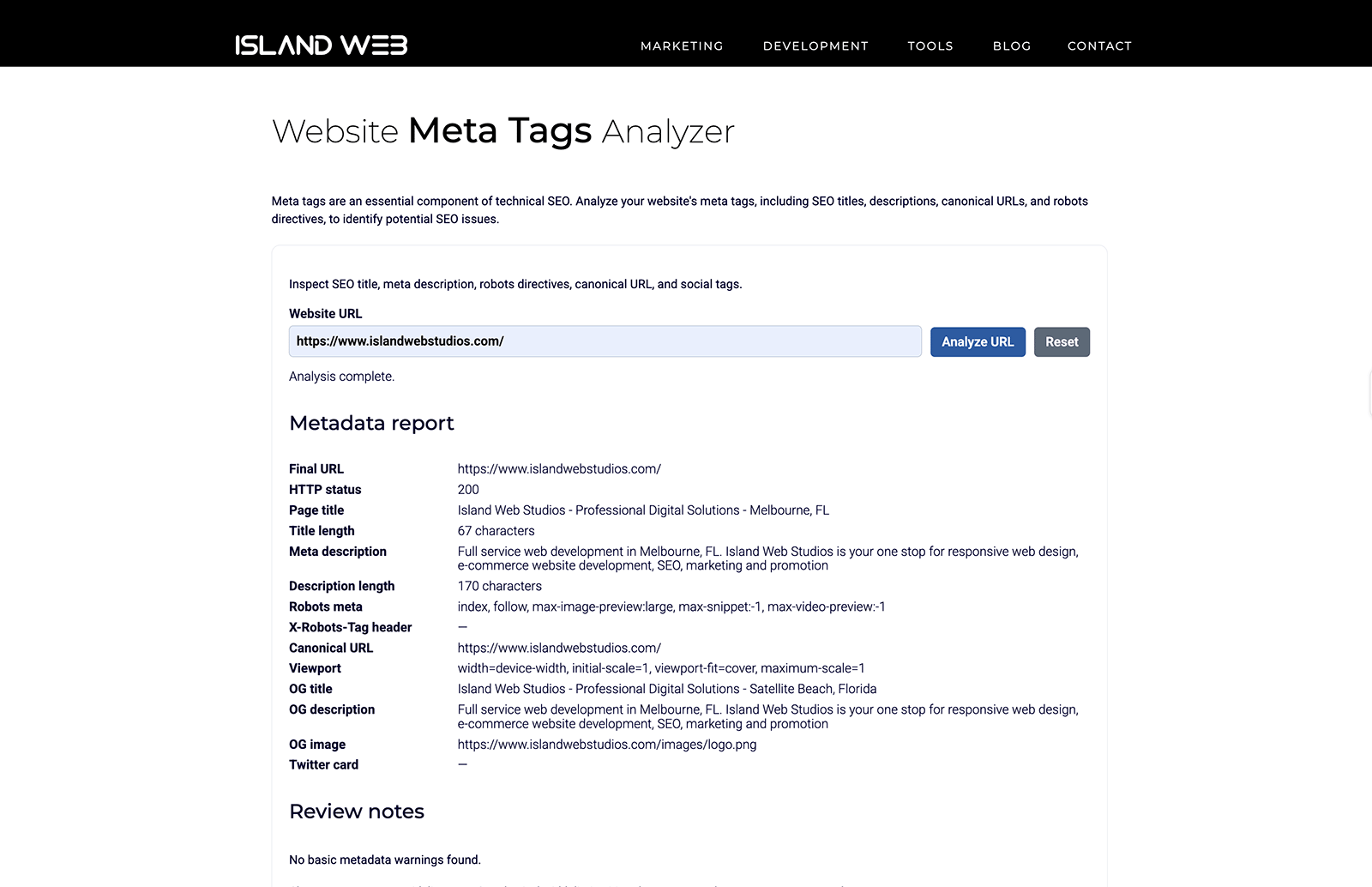
Meta tags are an essential component of technical SEO. Analyze your website's meta tags, including SEO titles, descriptions, canonical URLs, and robots directives, to identify potential SEO issues.
Inspect SEO title, meta description, robots directives, canonical URL, and social tags.
How to Use the Meta Tags Analyzer
Our free Meta Tags Analyzer makes it easy to inspect your website's metadata without manually searching through the HTML source code. Follow these seven steps to identify potential technical SEO issues and verify your website's configuration.
Step 1: Enter a Website URL
Enter the complete URL of the publicly accessible webpage you want to analyze, including the HTTPS or HTTP prefix. You can inspect your homepage, service pages, blog articles, product pages, or other individual pages.
Step 2: Run the Analysis
Click the Analyze URL button. The tool retrieves the webpage and extracts important metadata from the HTML returned by the web server.
Step 3: Review the Title and Meta Description
Check that your SEO title and meta description accurately represent the content of the page. Look for missing information, generic wording, or metadata that does not reflect the page's primary topic.
Use our Google SERP Preview Tool to refine your title and description and visualize their potential appearance in Google search results.
Step 4: Inspect Canonical and Robots Directives
Review the canonical URL to ensure it identifies your preferred version of the webpage. Examine the robots meta directives for unintended indexing restrictions, particularly an accidental noindex directive on a page you want search engines to index.
Step 5: Review Viewport and Social Metadata
Check the viewport configuration for mobile compatibility. Review your Open Graph and Twitter/X metadata to ensure your page communicates the correct title, description, and image when shared on social media.
Our Open Graph Preview Tool can help you further evaluate your social sharing metadata.
Step 6: Correct Metadata Problems
If you discover missing, incorrect, or conflicting metadata, update your HTML source, website templates, CMS settings, or SEO plugin configuration. When the same issue affects multiple pages, correcting the underlying template may resolve the problem more efficiently.
Step 7: Run the Analysis Again
After publishing your changes, run the Meta Tags Analyzer again to verify that your website returns the intended metadata.
Repeat this process periodically and after significant website updates, migrations, or changes to your content management system.
Understanding the Limitations of Metadata Analysis
The Meta Tags Analyzer inspects the HTML returned by the web server. Metadata inserted or modified later by JavaScript may not appear in the results. Some websites may also restrict automated requests.
This tool does not determine search engine rankings, confirm Google indexing status, or replace a comprehensive technical SEO audit. Use it alongside other website analysis tools and Google Search Console for a more complete evaluation.
What Are Website Meta Tags?
Meta tags are pieces of information placed in the head of an HTML document. They generally do not appear as visible page content, but they communicate information to browsers, search engines, and other applications. Examples include the meta description, robots directives, viewport settings, and character encoding. Related head elements such as the title and canonical link are not technically meta tags, but they are commonly included in a metadata audit because they serve similar practical purposes. Some metadata affects how a page may be presented in search results; other fields affect crawling, indexing, responsive layout, or social previews. Not every tag has SEO value. Older fields such as meta keywords are not used by Google for web ranking, and adding more tags is not automatically better. The goal is accurate, consistent metadata that supports the page's real content and technical configuration. Our analyzer helps you inspect those signals without manually searching through the entire HTML source.
The HTML Title Element
The title element is one of the most important page-level signals to review. It identifies the page in browser tabs and can influence the title link search engines display, although search engines may generate different wording. A useful title is specific, readable, and closely aligned with the page's main topic. Avoid generic titles such as Home or Services when a more descriptive alternative is available. Don't repeat the same title across many unrelated pages. For service pages, include the service and relevant differentiator; for articles, describe the question or topic clearly. There is no fixed character limit that guarantees a particular appearance in Google because display width and rewriting vary. Treat preview tools as guidance rather than strict rules. When reviewing results, ask whether the title accurately distinguishes this page from the rest of your website. If it does not, improve the title before worrying about minor differences in length.
Writing a Useful Meta Description
The meta description summarizes a page for systems that may use it as a search snippet. Google can choose other text from the page instead, so a description is a suggestion rather than a guaranteed display. Write a concise, natural summary that explains what the visitor will find. Include the main topic when it fits, but avoid a list of repeated keywords. For a service page, mention the service and an important benefit. For an article, explain the question answered or the practical takeaway. Descriptions should be unique where possible, especially for important landing pages. If many pages use the same generic text, visitors receive less useful context in search results. A missing description is not automatically a critical SEO failure, but adding a strong one is often worthwhile. The analyzer helps you locate the current value so you can decide whether it needs editing.
Canonical URLs and Duplicate Content
The rel=canonical link element identifies the preferred URL for a page when multiple URLs contain identical or substantially similar content. For example, a website might serve a product through multiple category paths or accept tracking parameters that create alternate addresses. A canonical declaration can help search engines consolidate their understanding of those variants. It is a hint, not an absolute command. Canonical signals should align with internal links, redirects, XML sitemaps, and the content itself. A canonical pointing to the wrong domain or an unrelated page deserves investigation. A self-referencing canonical is common and often useful, but not every page requires one. If a page is intentionally redirected, inspect the final destination instead of treating the old URL's metadata as the primary source. Use the analyzer to identify the declared canonical and compare it with the address you tested. Conflicts can reveal template errors or migration leftovers.
Robots Meta Tags and Indexing Directives
Robots directives tell compatible crawlers how a page may be handled. Common values include index, noindex, follow, and nofollow. A noindex directive asks supporting search engines not to include the page in search results. This can be appropriate for private utility pages, certain search results, or content that should remain publicly accessible but not indexed. However, accidentally applying noindex to an important landing page can be a serious issue. Robots directives may appear in HTML meta tags or in HTTP X-Robots-Tag headers. Our analyzer focuses on the metadata it extracts from the page; verify header-level directives separately if necessary. Also remember that robots.txt crawling restrictions and page-level noindex directives are different mechanisms. Blocking a crawler from fetching a page may prevent it from seeing the noindex instruction. When diagnosing indexing, inspect the complete set of signals and the search engine's own reports.
Viewport and Mobile-Friendly Configuration
The viewport meta tag helps mobile browsers determine how to size and scale the page. A common declaration is width=device-width with an initial scale of 1. Without an appropriate viewport configuration, a responsive layout may appear zoomed out or behave unexpectedly on phones. The viewport tag does not create responsive design by itself; the CSS still needs to adapt to available screen sizes. Likewise, a correct viewport declaration does not guarantee accessible touch targets, readable typography, or fast mobile performance. It is one basic check in a larger usability review. If the analyzer reports a missing or unusual viewport value, inspect the page on real devices or in browser responsive mode. For modern websites, the best result is generally a viewport configuration that allows normal user zoom and works with flexible layouts. Avoid using restrictive settings that prevent visitors from enlarging content when they need to.
Social Metadata and Consistent Messaging
Open Graph and Twitter/X card tags describe how a page may appear when shared. They are distinct from search-result metadata, but they should tell a consistent story about the destination. A page can have an excellent SEO title while still showing a generic image or outdated description in social previews. Review og:title, og:description, og:image, og:url, and any relevant Twitter/X tags. If multiple plugins output conflicting values, simplify the setup so one system is responsible for each field. Make sure image URLs are public and stable. Our analyzer provides a broader metadata view, while the Open Graph Preview Tool focuses specifically on the appearance and completeness of social-sharing information. Together they can help identify whether a problem belongs to the page's HTML metadata, the image asset, or a platform's caching behavior. Avoid treating every missing optional social tag as an emergency; prioritize fields that affect real sharing use cases.
A Metadata Audit Workflow for Website Owners
Build a repeatable checklist for your most important page templates. Confirm that each page has a descriptive title, appropriate meta description, intended canonical URL, and correct indexing directives. Verify that the viewport tag supports mobile rendering and that social metadata matches the page. For multilingual or international websites, review hreflang separately because it has its own requirements. For ecommerce, check product variants and faceted navigation carefully so canonical signals are intentional. During migrations, look for old domains, staging references, and accidental noindex tags. Keep a record of the changes made and the URLs tested. I've found that metadata quality improves most when the CMS or template system generates sensible defaults but still allows editors to customize important pages. Use the analyzer as a quick inspection tool, then validate broader crawl and indexing behavior with dedicated tools and search engine reports.
Common Metadata Mistakes
Duplicate titles, empty descriptions, conflicting canonical tags, and accidental noindex directives are frequent sources of confusion. Another problem is metadata copied from a staging website, leaving a canonical URL that points to a development domain. Some pages contain multiple description tags because a theme and plugin both output one. Others use an outdated Open Graph image long after the visible page has been redesigned. Automated templates can also produce titles that are too generic or repeat the same phrase across many URLs. Start with errors that change the page's identity or indexing eligibility, then improve the wording of titles and descriptions. Do not make every page use identical metadata simply for consistency. A useful page title should distinguish the content. When troubleshooting, remember that a search engine may still display a different title or snippet even when your HTML is correct. That is not proof that the metadata is invalid.
Frequently Asked Questions
What is a meta tags analyzer?
It retrieves a webpage and displays important metadata such as its title, description, canonical URL, robots directives, and social tags.
Are meta keywords important for Google SEO?
No. Google does not use the meta keywords tag for web ranking. Focus on useful content and meaningful metadata instead.
Does a meta description directly improve rankings?
The description is not a direct Google ranking factor. It can help explain a page when used in a search snippet.
Can Google rewrite my title or description?
Yes. Search engines may generate different title links and snippets based on the query and page content.
What is a canonical tag?
A canonical link identifies a preferred URL among similar or duplicate versions. Search engines treat it as a signal rather than a guarantee.
What does noindex mean?
It asks supporting search engines not to include the page in their search results once they can crawl and process the directive.
Is robots.txt the same as a robots meta tag?
No. Robots.txt controls crawler access to paths; robots meta directives govern supported indexing or link-following behavior on a fetched page.
Why does the tool show missing tags?
The tags may be absent from the server response, injected later by JavaScript, or unavailable because the page returned an error or challenge.
Should every page have a unique title?
Important distinct pages should have descriptive, differentiating titles. Repeating one generic title across unrelated pages is usually unhelpful.
Does the analyzer check Google indexing status?
No. It inspects page metadata, not Google’s index. Use Search Console for search engine-specific indexing information.
Can I analyze any public website?
You can test publicly reachable pages within the tool’s request limits. Some sites block automated clients.
How often should I check meta tags?
Check after launches, migrations, theme or plugin changes, and periodically on representative important pages.
Explore Related Website Tools
Related tools: use Google SERP Preview to refine titles and descriptions, Open Graph Preview for social cards, and XML Sitemap Validator to check sitemap structure.