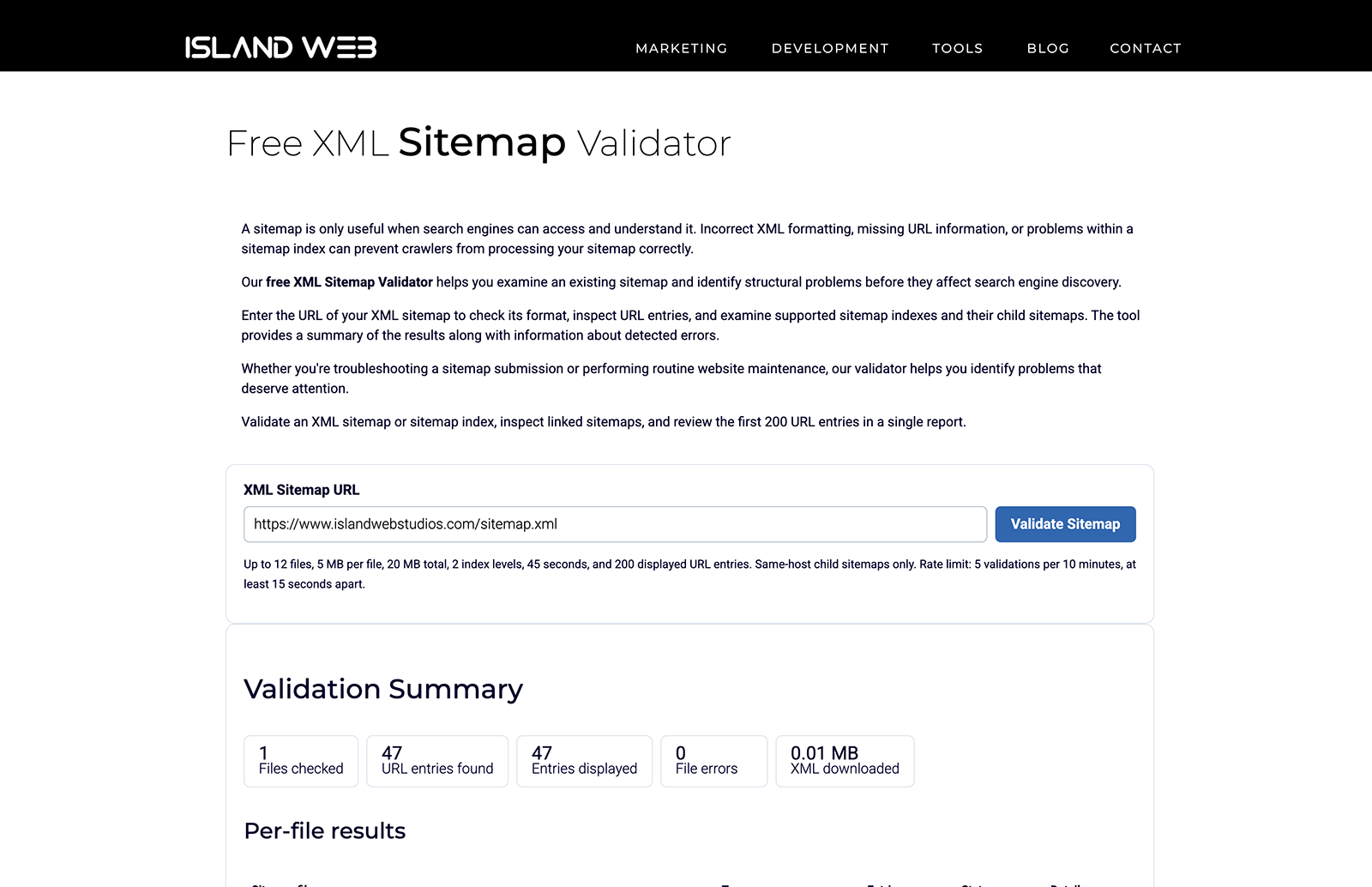
A sitemap is only useful when search engines can access and understand it. Incorrect XML formatting, missing URL information, or problems within a sitemap index can prevent crawlers from processing your sitemap correctly.
Our free XML Sitemap Validator helps you examine an existing sitemap and identify structural problems before they affect search engine discovery.
Enter the URL of your XML sitemap to check its format, inspect URL entries, and examine supported sitemap indexes and their child sitemaps. The tool provides a summary of the results along with information about detected errors.
Whether you're troubleshooting a sitemap submission or performing routine website maintenance, our validator helps you identify problems that deserve attention.
Validate an XML sitemap or sitemap index, inspect linked sitemaps, and review the first 200 URL entries in a single report.
How to Use Our XML Sitemap Validator
Our free XML Sitemap Validator makes it easy to inspect your website's sitemap without manually examining the XML source code. You can check individual sitemap files, investigate sitemap indexes, and identify potential structural problems that may interfere with search engine processing.
Step 1: Locate Your Sitemap URL
Find the publicly accessible URL of your website's XML sitemap. Many websites publish their sitemap using one of the following addresses:
If you are unsure where your sitemap is located, check your website's robots.txt file, content management system, or SEO plugin settings.
Step 2: Enter the Complete URL
Enter the full sitemap URL into the XML Sitemap Validator, including the HTTPS or HTTP prefix, domain name, and file path.
Make sure you enter the address of the sitemap itself rather than the address of your website's homepage.
If you have not created a sitemap yet, use our free XML Sitemap Generator to discover website pages and generate a downloadable sitemap.xml file.
Step 3: Run the Validation
Click the Validate Sitemap button to begin the analysis. The tool retrieves the sitemap document and performs XML formatting and structural checks.
When the submitted document is a sitemap index, the validator can also examine referenced child sitemaps within its configured processing limits.
Step 4: Review the Summary
Examine the validation summary to understand the results. Look for XML parsing errors, missing information, unavailable child sitemaps, and other potential structural problems.
Pay particular attention to whether the document has been identified as a standard URL sitemap or a sitemap index.
If problems are reported, investigate the affected files before submitting your sitemap to search engines.
Step 5: Inspect the URL Entries
Review the displayed URLs and available sitemap metadata. Look for unexpected addresses, outdated pages, duplicate content, or URLs that should not be included in your sitemap.
The validator displays a maximum of 200 URL entries to keep the report manageable. Larger sitemaps may contain considerably more URLs than are shown in the preview.
Remember that reviewing a sitemap entry does not verify the associated page's HTTP response or indexing status. Use our HTTP Redirect Checker, Broken Link Checker, or Canonical URL Checker when additional investigation is necessary.
Step 6: Correct Any Problems
If the validator identifies an issue, correct the XML file or the application responsible for generating it.
For websites that automatically generate sitemaps, the underlying problem may be related to a content management system, SEO plugin, database query, or custom sitemap-generation script.
After publishing your corrections, run the XML Sitemap Validator again to verify that the reported structural problems have been resolved.
What to Do After Validation
Once your sitemap has passed validation, confirm that it remains publicly accessible and submit its URL through Google Search Console and Bing Webmaster Tools. You can also reference the sitemap location in your robots.txt file.
Successful validation does not guarantee that every listed webpage will be crawled or indexed. Sitemap validation is an important part of technical SEO, but page accessibility, canonical directives, internal linking, content quality, and indexing signals must also be considered.
What Is XML Sitemap Validation?
XML sitemap validation is the process of checking whether a sitemap follows the formatting and structural requirements of the XML sitemap protocol.A sitemap may look perfectly normal when opened in a browser but still contain errors that make it difficult for search engines to process.
For example, a sitemap might contain malformed XML, incorrect namespace information, missing required elements, or invalid URL entries.Validation helps identify these problems so they can be corrected before or after submitting the sitemap to search engines. Unlike a sitemap generator, which creates a list of website URLs, a sitemap validator examines an existing XML file.
Why Should You Validate Your XML Sitemap?
Website changes can introduce sitemap problems without anyone noticing. A CMS update, plugin conflict, server configuration change, or incorrect sitemap-generation script may produce invalid XML.
Regular validation helps you catch these issues before they become persistent technical SEO problems.
Detect XML Formatting Problems
XML follows strict syntax rules. An improperly closed tag, invalid character, or incorrect document structure can make a sitemap unreadable.
A validator can identify parsing errors that prevent the XML document from being processed.
Identify Missing or Incorrect Elements
Standard XML sitemaps require specific structural elements.
For example, URL entries must contain a valid <loc> element identifying the page.
A validator can help detect missing elements and improperly structured entries.
Troubleshoot Sitemap Indexes
Larger websites often use sitemap indexes to organize multiple sitemap files.
If an index references an unavailable or malformed child sitemap, search engines may be unable to process that portion of the website's URL inventory.
Our validator can examine supported child sitemaps and report problems encountered during retrieval or parsing.
Check Sitemaps After Website Changes
Website migrations, domain changes, URL restructuring, and CMS updates are common opportunities for sitemap errors to appear.
Validating your sitemap after significant changes is a useful quality-control step.
Common XML Sitemap Errors and How to Fix Them
1. Malformed XML
XML must follow strict formatting rules. Missing closing tags, improperly nested elements, and invalid characters can cause parsing failures.
How to fix it: Inspect the reported XML error and correct the source file or the sitemap-generating script. If your CMS produces the sitemap automatically, investigate the responsible plugin or module.
2. Incorrect XML Namespace
Standard XML sitemaps use the namespace:
A missing or incorrect namespace may cause validation or compatibility problems.
How to fix it: Make sure your sitemap's root element uses the appropriate namespace and structure.
3. Missing URL Locations
Every standard sitemap URL entry requires a <loc> element containing the URL. A missing or empty location means the entry doesn't properly identify a page.
How to fix it: Update the sitemap generator to output a complete URL for each entry.
4. Invalid or Incorrect URL Formats
Sitemap URLs should use complete, absolute addresses with an appropriate scheme and hostname. Relative paths such as /services/ are not valid replacements for full URLs in standard sitemap entries.
How to fix it: Use absolute URLs such as https://www.example.com/services/ and ensure special XML characters are properly escaped.
5. Unavailable Child Sitemaps
A sitemap index can reference multiple sitemap files. If one is missing, inaccessible, or malformed, that portion of the index cannot be processed successfully.
How to fix it: Check the referenced sitemap URL, server response, permissions, and generated XML.
6. Unexpected HTML Instead of XML
Sometimes a sitemap URL returns an HTML error page, security challenge, or redirect destination rather than the expected XML document.
How to fix it: Check the server configuration, caching layer, security rules, and the sitemap endpoint itself.
7. Outdated or Unwanted URLs
A sitemap can be structurally valid while still containing pages that have been deleted, redirected, or marked as noncanonical.
How to fix it: Review the listed URLs against your current website and update the sitemap-generation rules.
Our validator helps inspect sitemap entries, but it does not individually request every listed webpage to verify its HTTP status or indexing eligibility.
Understanding Sitemap Validation Results
A successful validation means the examined sitemap passed the structural checks performed by the tool.
It does not mean every listed page is indexed, that all URLs return HTTP 200, or that Google considers every URL canonical.
There are several different aspects of sitemap quality:
| Check | What it tells you |
| XML syntax | Whether the document can be parsed |
| Sitemap structure | Whether required sitemap elements are present |
| Sitemap index processing | Whether supported child sitemap files can be examined |
| URL inventory | Which URL entries appear in the sitemap |
| Page accessibility | Whether individual pages can be retrieved — requires separate checks |
| Indexing status | Whether search engines have indexed pages — requires search engine data |
A validator is one part of technical SEO testing, not a substitute for a full website crawl or Google Search Console.
When Should You Validate Your Sitemap?
I recommend validating your sitemap whenever you make changes that could affect how URLs are generated or organized.
Particularly useful times include:
- After launching a new website
- Following a website migration or domain change
- After modifying URL structures
- Following major CMS or plugin updates
- When adding or changing sitemap-generation software
- After discovering sitemap errors in Google Search Console
- During periodic technical SEO reviews
For websites with automatically generated sitemaps, occasional validation is still worthwhile. Automation reduces manual work, but it doesn't eliminate the possibility of configuration errors.
What to Do After Your Sitemap Passes Validation
Once your sitemap is structurally sound, make sure it's accessible to search engines.
You can submit the sitemap URL through Google Search Console and Bing Webmaster Tools, and include a sitemap reference in your robots.txt file.
Monitor the search engines' sitemap reports for retrieval, parsing, and indexing issues.
If your sitemap is valid but important pages still aren't indexed, investigate the pages themselves. Internal linking, canonical directives, crawl restrictions, content quality, and indexing signals can all influence the outcome.
Need to create a sitemap first? Try our free XML Sitemap Generator to discover website pages and download a sitemap file.
XML Sitemap Validator FAQ
What does an XML sitemap validator do?
An XML sitemap validator examines an existing sitemap to identify formatting, parsing, and structural problems. Depending on the tool, it may also inspect sitemap indexes and display URL entries.
Is this sitemap validator free?
Yes. Our XML Sitemap Validator is free to use, subject to reasonable request and processing limits.
Can I validate a sitemap index?
Yes. The validator supports sitemap indexes and can examine referenced child sitemaps within its configured depth, file, and processing limits.
Why does my sitemap show an XML parsing error?
Parsing errors usually indicate malformed XML, such as missing closing tags, invalid characters, or improperly nested elements. The sitemap-generating software may need to be corrected.
Why does my sitemap work in a browser but fail validation?
Browsers may display XML content even when it contains structural problems. In other cases, the browser and validator may receive different responses because of redirects, security settings, or server behavior.
Does a valid XML sitemap guarantee Google indexing?
No. A valid sitemap helps search engines discover URLs, but indexing depends on additional factors, including page accessibility, content quality, canonicalization, and search engine decisions.
Does the validator check every page for broken links?
No. The validator examines sitemap files and their entries. It does not perform a separate HTTP status check for every page listed in the sitemap.
Why does the validator display only 200 URLs?
The tool limits the displayed URL entries to keep reports manageable and reduce resource usage. The display limit doesn't necessarily mean your sitemap contains only 200 URLs.
Can I validate a sitemap with thousands of URLs?
The validator can process sitemap files within its configured resource limits, but large files or deeply nested indexes may exceed those limits. The URL preview is limited to 200 entries.