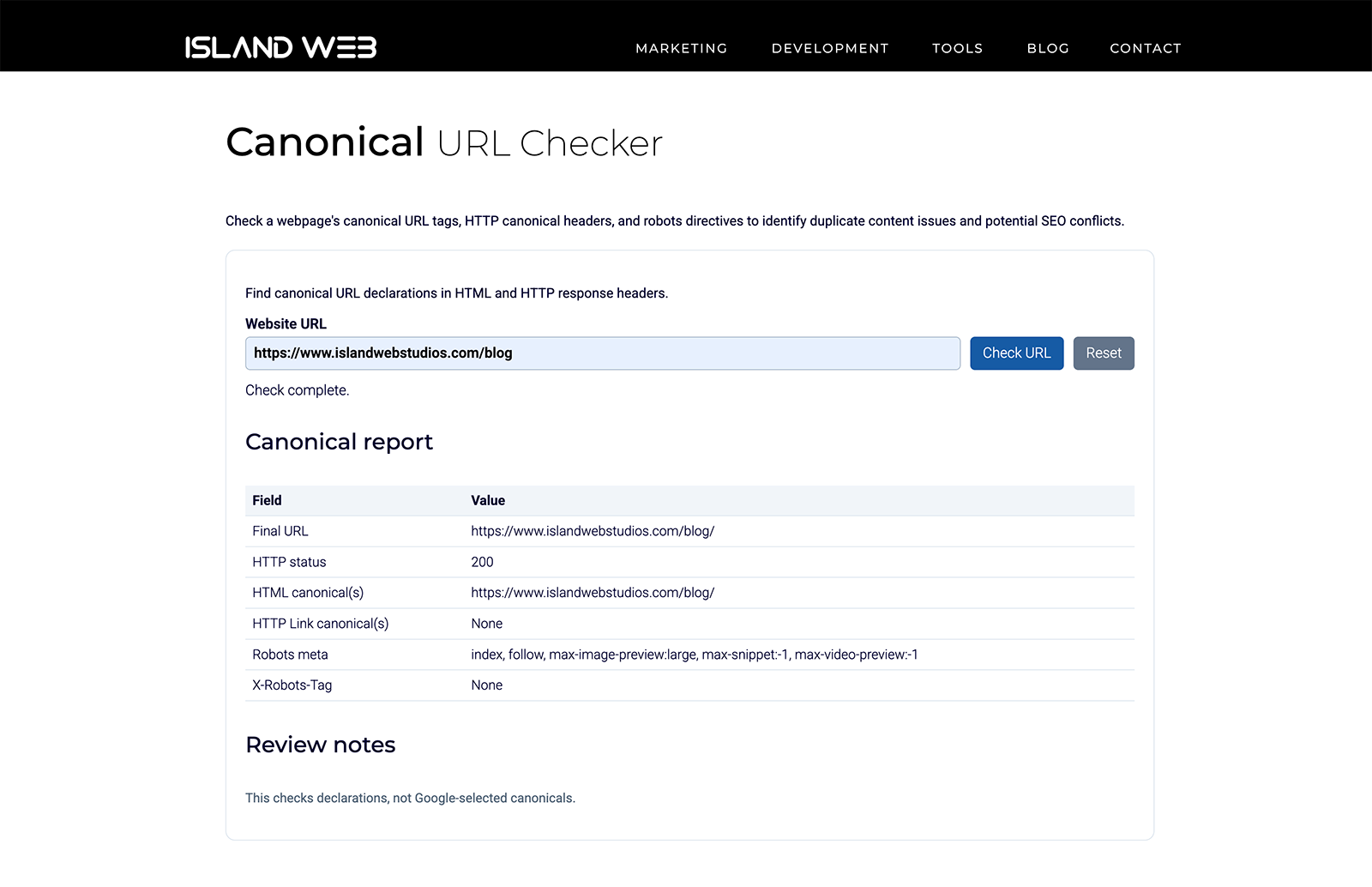
Check your website's canonical URLs with our free Canonical URL Checker. Inspect HTML rel=canonical tags, HTTP canonical headers, redirects, and robots directives to identify potential canonicalization problems. Verify that your website communicates the intended preferred URLs to search engines and avoid conflicting technical SEO signals.
Find canonical URL declarations in HTML and HTTP response headers.
How to Use Our Canonical URL Checker
Our free Canonical URL Checker makes it easy to examine the canonical declarations and related technical SEO information associated with a webpage. Instead of manually searching through HTML source code and HTTP response headers, you can review the information in one place.
Follow these eight steps to inspect your canonical URL configuration and identify potential problems.
Step 1: Enter the Webpage URL
Enter the complete URL of the publicly accessible webpage you want to examine.
Include the HTTP or HTTPS protocol and any relevant URL path or query parameters.
For example, you may want to examine your homepage, a product page, a blog article, or a URL containing marketing tracking parameters.
Testing different versions of the same webpage can help you determine whether your website communicates a consistent preferred URL.
Step 2: Run the Canonical URL Check
Click Check URL to retrieve the webpage and examine its canonical declarations and related robots directives.
The tool inspects the response received from the destination website and presents the relevant information for review.
You do not need access to the website's administration panel or source files to examine publicly accessible canonical declarations.
Step 3: Compare the Requested and Final URLs
Review the original requested URL and the final URL returned after any redirects to determine whether the destination matches your intended URL structure.
For example, a request using HTTP may redirect to HTTPS, or a URL without a trailing slash may redirect to a standardized version.
These redirects may be intentional and beneficial. However, unexpected redirects can reveal configuration problems that interfere with your canonicalization strategy.
For additional redirect troubleshooting, use our free HTTP Redirect Checker.
Step 4: Review the HTML Canonical Declaration
Examine the canonical URL declared in the HTML document and confirm that it identifies the intended preferred version of the content.
A webpage intended to serve as the preferred version will often contain a self-referencing canonical. A duplicate or substantially similar webpage may instead identify another URL as canonical.
Check the protocol, hostname, path, trailing slash, and query parameters. Even small inconsistencies can result in different URL addresses.
Pay particular attention to canonical declarations that reference outdated domains, staging websites, unexpected query parameters, or unrelated pages.
Step 5: Inspect HTTP Canonical Headers
Review any canonical declarations found in HTTP Link response headers and compare them with the HTML canonical declaration.
Canonical information can be provided through HTTP headers as an alternative to HTML markup. This is particularly useful for resources such as PDF documents.
If your website provides canonical declarations through both methods, they should communicate the same preferred URL.
Unexpected HTTP canonical headers may originate from server configurations, application frameworks, content delivery networks, or other infrastructure.
Our HTTP Headers Checker can help you investigate additional response header information.
Step 6: Review Robots Directives
Inspect reported robots meta tags and X-Robots-Tag headers for indexing restrictions that may affect your intended canonicalization strategy.
A canonical declaration identifies a preferred URL, while a noindex directive requests that a page be excluded from search results.
These are different instructions. A canonical URL pointing to an important page does not automatically resolve indexing restrictions associated with that destination.
Use our Website Meta Tags Analyzer to examine additional metadata and robots directives when investigating indexing problems.
Step 7: Investigate Potential Canonicalization Issues
Investigate missing, unexpected, or conflicting canonical declarations and compare them with your redirects, XML sitemaps, internal links, and preferred URL structure.
Common issues include:
- Canonical declarations pointing to unrelated pages.
- Multiple canonical tags identifying different destinations.
- HTTP canonical URLs on websites that use HTTPS.
- Canonical declarations referencing redirected or unavailable pages.
- Incorrect canonical URLs following a website migration.
- Tracking parameters included in preferred URLs unintentionally.
- Inconsistent canonical destinations in HTML and HTTP headers.
- XML sitemap entries that disagree with declared canonical URLs.
Not every missing or non-self-referencing canonical is an error. Consider your website's intended URL architecture and the relationship between the affected pages before making changes.
You can use our XML Sitemap Validator and Broken Link Checker as part of a broader technical SEO investigation.
Step 8: Correct Problems and Run the Check Again
Update the relevant website templates, server configuration, or content management settings. Run the check again and use Google Search Console when appropriate to investigate Google's selected canonical.
Canonical problems are often caused by website templates, SEO plugins, routing configurations, or server settings rather than individual page content.
Correcting the underlying configuration can resolve similar problems across multiple pages.
After publishing your changes, clear any relevant website or CDN caches and test representative URLs again.
Remember that search engines may need time to recrawl and process updated canonical information.
Understanding Your Canonical URL Checker Results
Canonical declarations should reflect your intended website structure. Understanding the relationship between the requested URL, final URL, canonical URL, and indexing directives can help you identify potential technical SEO problems.
Self-Referencing Canonical URLs
A self-referencing canonical identifies the current preferred URL as the canonical version of the webpage.
This is common for individual pages that are intended to appear in search results, including service pages, product pages, and blog articles.
Canonical URLs Pointing to Another Page
A canonical declaration pointing to another URL is not necessarily a problem. It may be appropriate when multiple addresses provide duplicate or substantially similar content.
Verify that the destination represents the same primary content and that the relationship is intentional.
Missing Canonical Declarations
A missing canonical tag does not automatically indicate an SEO error. However, explicit canonical declarations can be useful for websites that generate multiple URL variations.
Consider adding a canonical declaration when it would clarify your preferred URL structure.
Conflicting Canonical Declarations
When multiple canonical declarations identify different destinations, search engines receive inconsistent information.
Investigate whether your website templates, SEO plugins, application code, or server configuration are generating duplicate or conflicting declarations.
Canonical URLs With Indexing Restrictions
Review canonical destinations for noindex directives, access restrictions, or other conditions that may prevent search engines from processing the intended page.
Ideally, the URL you want indexed should be accessible, contain the intended content, and receive consistent canonicalization signals.
Canonical URLs That Redirect
A canonical declaration should generally identify the final preferred URL rather than an address that redirects elsewhere.
If a canonical destination redirects, consider updating the declaration to point directly to the intended destination.
Recommended diagnostic reference table
| Result or condition | What it means | Recommended action |
|---|---|---|
| Self-referencing canonical | Current URL is declared preferred | Verify it matches your intended URL |
| Canonical points elsewhere | Another URL is declared preferred | Confirm equivalent content |
| Missing canonical | No explicit preferred URL | Evaluate whether one is needed |
| Duplicate identical declarations | Redundant canonical information | Simplify the implementation |
| Conflicting canonical declarations | Different preferred URLs identified | Correct conflicting declarations |
| Canonical destination redirects | Preferred address is not final | Investigate and update the destination |
| Canonical destination returns an error | Preferred content may be unavailable | Correct the destination |
| Canonical destination contains noindex | Preferred URL requests exclusion | Review indexing strategy |
| Unexpected domain or protocol | Possible configuration error | Verify hostname and HTTPS settings |
Canonical URL examples
Example 1: Self-referencing canonical
Requested URLhttps://example.com/services/
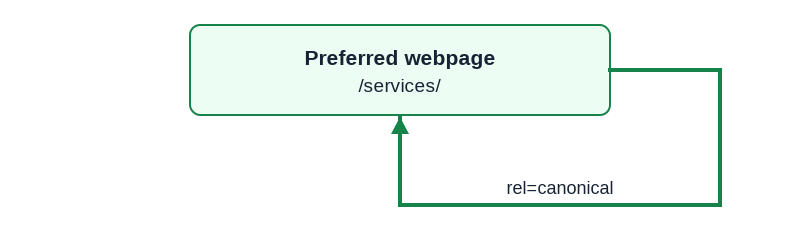
href="https://example.com/services/">
Example 2: Tracking parameter canonicalization
Requested URLhttps://example.com/services/
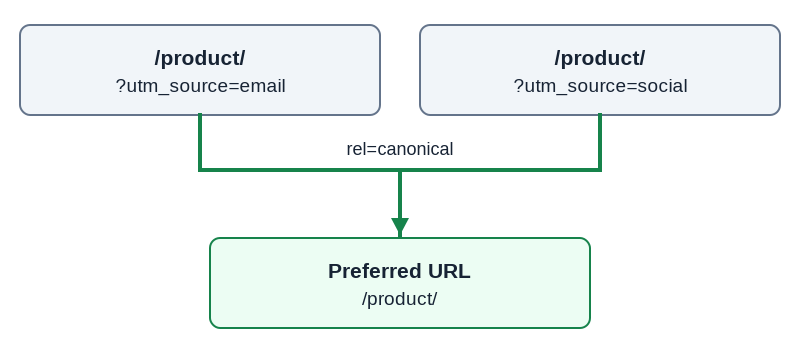
href="https://example.com/product/">
Example 3: Conflicting canonical declarations
Requested URLhttps://example.com/services/
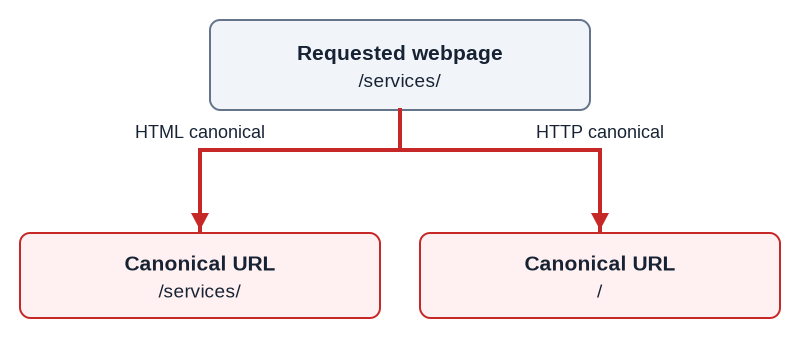
href="https://example.com/services/">
Canonical URL Checker: A Practical Guide
A canonical URL identifies the preferred address for a page when similar content can be reached through multiple URLs. Canonical signals help search engines decide which version to represent in search results, but they can be difficult to troubleshoot when a website has redirects, tracking parameters, duplicate templates, or inconsistent metadata. Our free Canonical URL Checker examines a public page for HTML canonical declarations, HTTP Link canonical headers, and related robots directives. It highlights potential conflicts so you can investigate whether the signals match your intended URL structure. Use it as a technical SEO diagnostic tool rather than a guarantee of which URL a search engine will ultimately select.
What Is a Canonical URL?
A canonical URL is the version of a page that you prefer search engines to treat as representative when several addresses contain duplicate or substantially similar content. For example, a product page might be accessible through a clean URL and another URL containing tracking parameters. A canonical declaration can point both versions toward the preferred address. In HTML, this is commonly expressed with a link element using rel="canonical". The declaration is a strong hint, not a command. Search engines evaluate other signals such as redirects, internal links, sitemap entries, and content similarity. A canonical tag should reflect a deliberate site architecture, not simply be added because an SEO checklist recommends it.
How rel=canonical Works in HTML
The HTML canonical element normally appears inside the document head. Its href attribute specifies the preferred URL, ideally as a complete absolute address. A common pattern is `<link rel="canonical" href="https://www.example.com/page/">`. The target should be a valid, accessible page that contains equivalent or very similar primary content. If the target redirects, is unavailable, or points to an unrelated page, the signal may be ignored or create confusion. Canonical elements should not be duplicated with different destinations. Keep generated metadata consistent across page templates, content management systems, and SEO plugins. When a page changes address permanently, a redirect may be more appropriate than leaving both URLs live with only a canonical hint.
HTTP Link Canonical Headers
Canonical declarations can also appear in an HTTP Link response header, a method especially useful for certain non-HTML resources such as PDFs. For example, a response may contain a Link header with a rel="canonical" relation. A website can expose both an HTML canonical and an HTTP canonical, but they should not disagree. If one points to the homepage and the other points to the current article, the conflicting signals complicate interpretation. Inspect the actual live response rather than assuming your template code is the only source. CDNs, applications, and server configurations can influence headers. The checker reports what it sees, allowing you to trace where a declaration originates.
Canonical Tags Versus Redirects
A canonical tag suggests a preferred version while allowing the current URL to remain accessible. A redirect sends the browser or crawler to a different URL. If a page has permanently moved and the old address is no longer useful, a 301 or 308 redirect is often the clearer choice. If multiple useful variations must remain accessible, a canonical may be appropriate. For example, a product can appear in multiple category paths, or a printable page may remain available alongside its standard version. Do not use canonical tags to compensate for broken navigation or an uncontrolled collection of parameter URLs. Decide whether the duplicate URL should exist first, then choose the appropriate signal.
Canonical URLs, Query Parameters, and Filters
Tracking parameters, sorting options, and filters can create many URL variants. Some produce substantially the same content; others produce meaningfully different results. A canonical strategy should reflect that distinction. A tracking parameter generally does not need its own indexable URL. A filtered category that serves a distinct search intent might deserve a separate canonical page, depending on the website. Automatically canonicalizing every filtered URL to the unfiltered category can hide useful pages from discovery. Conversely, allowing thousands of trivial combinations to self-canonicalize can create unnecessary crawl complexity. Test representative URL variations and document your rules so future developers understand the intent.
Self-Referencing Canonicals and Common Mistakes
A self-referencing canonical points to the current preferred URL and is common on pages intended to be indexed. Problems arise when the canonical uses the wrong hostname, HTTP instead of HTTPS, a staging domain, an outdated path, or a URL that returns an error. Duplicate canonical elements with different targets are another frequent issue. Templates sometimes generate a canonical from the raw request URL, accidentally preserving tracking parameters. Others hard-code the homepage on every page. During migrations, stale canonicals can remain after redirects are updated. Check page templates, CMS settings, and plugins together. A consistent canonical policy is more valuable than a collection of isolated fixes.
Canonical Tags and Robots Directives
Canonical declarations and robots directives address different concerns. A canonical suggests which duplicate URL should be preferred. A noindex directive requests that a page not be indexed. Combining noindex with a canonical pointing elsewhere is not a reliable substitute for a clear canonicalization strategy. If your goal is to consolidate duplicate URLs, use appropriate canonical signals and consistent linking rather than relying on noindex to force consolidation. The checker reports relevant robots information because a page with noindex may not behave as expected in search even when its canonical looks correct. Review X-Robots-Tag headers and HTML robots meta tags as part of the larger picture.
How Canonical Signals Relate to XML Sitemaps
Your XML sitemap should generally list the canonical URLs you want indexed. Including alternate tracking URLs, redirected addresses, and duplicate paths can send mixed signals. Internal links should also favor the preferred version wherever practical. A canonical tag alone cannot repair every inconsistency in site architecture. When search engines see one URL in a sitemap, another in navigation, and a third in a canonical declaration, they must reconcile competing hints. During an SEO audit, compare the canonical checker result with your sitemap and redirect configuration. This is especially important after a domain migration, HTTPS conversion, or CMS restructuring.
What the Checker Cannot Determine
The tool can inspect declarations and highlight apparent inconsistencies, but it cannot prove that a search engine accepts the chosen canonical. Google may select a different representative URL based on duplication, redirects, links, and other signals. The checker also cannot determine whether two pages are substantially equivalent without comparing their content in context. A canonical pointing to another page is not automatically an error. For final diagnosis, review Google Search Console’s indexing information, inspect the destination page, and test related URL variants. Treat canonical checking as a focused step in a broader technical SEO workflow, not a single pass-or-fail ranking test.
Canonicalization for Ecommerce Websites
Ecommerce sites often generate multiple paths to similar products through categories, sorting, filters, and tracking links. A product may appear under several navigation routes while representing the same item. A consistent canonical strategy can reduce duplicate URL signals, but it must preserve genuinely useful category and filtered pages. Decide which URLs should be discoverable and indexable before configuring the tags. Check product templates and category templates separately, because they often have different requirements. Also verify that a product’s canonical does not accidentally point to an out-of-stock replacement or unrelated variant. During catalog changes, coordinate canonicals with redirects, internal links, and XML sitemaps.
Diagnosing Canonical Problems After a Migration
A website migration can leave old domains or staging addresses in canonical tags even after visitors are correctly redirected. This happens when metadata is generated from hard-coded configuration, cached templates, or plugins that were not updated. Test the homepage, representative category pages, articles, and URLs with query parameters. Compare the final URL after redirects with the declared canonical and inspect whether the canonical destination is accessible. If multiple domains are involved, make sure internal links and sitemap URLs support the same preferred host. Fix the configuration that generates the error rather than manually editing hundreds of pages. Then verify the live HTML and headers after caches clear.
Example: Tracking URLs in Marketing Campaigns
A marketing email might link to a service page with UTM parameters so analytics can identify the campaign. That URL usually displays the same main content as the clean service URL. Ideally, your canonical strategy indicates the clean address as preferred, while the campaign link still works for measurement. Test the clean URL and a parameterized variation. Verify that the page is accessible, the canonical points to the intended version, and the sitemap lists the clean URL. Avoid generating a self-referencing canonical from the full incoming request if it would include arbitrary tracking parameters. Also remember that search engines can evaluate other signals, so consistent internal linking matters alongside the canonical declaration.
How Canonical URLs Support SEO, AEO and GEO
A consistent URL structure is an important part of maintaining a technically sound website. When multiple URLs provide the same or substantially similar content, canonical declarations can help communicate which address should be treated as the preferred version.
Canonical URLs and Traditional SEO
Search engines can discover multiple versions of a webpage through internal links, marketing campaigns, query parameters, redirects, and external websites.
A consistent canonicalization strategy helps search engines interpret these relationships and may support the consolidation of search signals associated with duplicate URLs.
Canonical declarations work best when supported by consistent internal links, XML sitemap entries, redirects, and accessible website content.
Canonical URLs and Answer Engine Optimization
Answer Engine Optimization focuses on making website information accessible, understandable, and useful to systems that provide direct answers.
Maintaining consistent preferred URLs helps reduce unnecessary duplication and establishes stable addresses for important website content.
This can be particularly useful for businesses publishing educational resources, frequently asked questions, product information, and detailed service descriptions.
Canonical URLs and Generative Engine Optimization
Generative Engine Optimization considers how website content may be discovered and represented by AI-powered search platforms.
Using consistent URLs throughout your website, structured data, internal links, and XML sitemaps can help maintain a clearer representation of your content for systems that process these signals.
However, AI platforms do not necessarily interpret canonical declarations in the same way as traditional search engines. Canonical tags alone cannot guarantee inclusion in AI-generated answers, citations, or recommendations.
Building a Consistent Technical SEO Foundation
Canonical URL configuration should be part of a broader strategy that includes structured data, website performance, crawl accessibility, internal linking, content quality, and accurate metadata.
At Island Web Studios, we combine professional web development with technical SEO, Answer Engine Optimization, and Generative Engine Optimization to help businesses establish a consistent and accessible online presence.
Frequently Asked Questions
What is a canonical URL checker?
It examines a page for canonical declarations and related signals to help identify missing, unexpected, or conflicting canonical URLs.
What does rel=canonical mean?
It identifies the preferred URL among duplicate or substantially similar versions of content.
Is a canonical tag required on every page?
No. Self-referencing canonicals are often useful, but their absence does not automatically make a page invalid.
Can Google ignore a canonical tag?
Yes. Canonicals are signals rather than guarantees. Search engines may select another URL when other evidence points elsewhere.
Should canonical URLs use HTTPS?
Use the actual preferred URL, which for modern public websites is generally the HTTPS version.
Can a canonical point to another domain?
Cross-domain canonicals are supported in some circumstances, but the target should be equivalent and the decision intentional.
What if a page has two canonical tags?
Multiple conflicting canonicals create ambiguity. Remove duplicates and output one consistent preferred URL.
Is a canonical tag the same as a 301 redirect?
No. A redirect changes where the visitor goes; a canonical lets the page remain accessible while suggesting a preferred version.
Should canonical URLs appear in XML sitemaps?
Generally yes. Sitemaps should list the preferred indexable URLs rather than duplicates or redirected variants.
Does noindex override a canonical?
The directives serve different purposes. Do not rely on their combination as a dependable way to consolidate duplicate URLs.
Can I check a PDF canonical?
A canonical may be declared through an HTTP Link header, which can be relevant to non-HTML resources.
How do I find Google’s selected canonical?
Use Google Search Console’s URL inspection and indexing reports. A third-party checker cannot directly reveal Google’s current selection.
How do I check the canonical URL of a webpage?
Enter the complete webpage address into our free Canonical URL Checker. The tool examines canonical declarations contained in the HTML and HTTP response headers and presents the relevant information for review.
Should a canonical URL include query parameters?
It depends on the purpose of the parameters. Tracking parameters generally do not need separate canonical URLs, while parameters that identify substantially different and valuable content may warrant their own preferred URL.
Should a canonical URL include a trailing slash?
Use the exact version of the URL that your website treats as preferred. Whether you use trailing slashes or not, maintain consistency across canonical declarations, redirects, internal links, structured data, and XML sitemaps.
Do canonical tags prevent duplicate content penalties?
Ordinary duplicate content does not automatically result in a Google penalty. Canonical declarations help communicate preferred URLs and may support the consolidation of signals associated with duplicate content.
Can a canonical URL be relative instead of absolute?
Relative canonical URLs can be supported, but complete absolute URLs are generally recommended because they reduce ambiguity and help prevent problems involving hostnames, protocols, and page paths.
Can canonical tags help my website appear in AI-generated answers?
Consistent canonical URLs can contribute to a clearer technical website structure. However, different AI platforms process website information differently, and canonical declarations do not guarantee AI visibility, citations, or recommendations.
Related Tools
Compare your results with our XML Sitemap Validator and Website Meta Tags Analyzer.