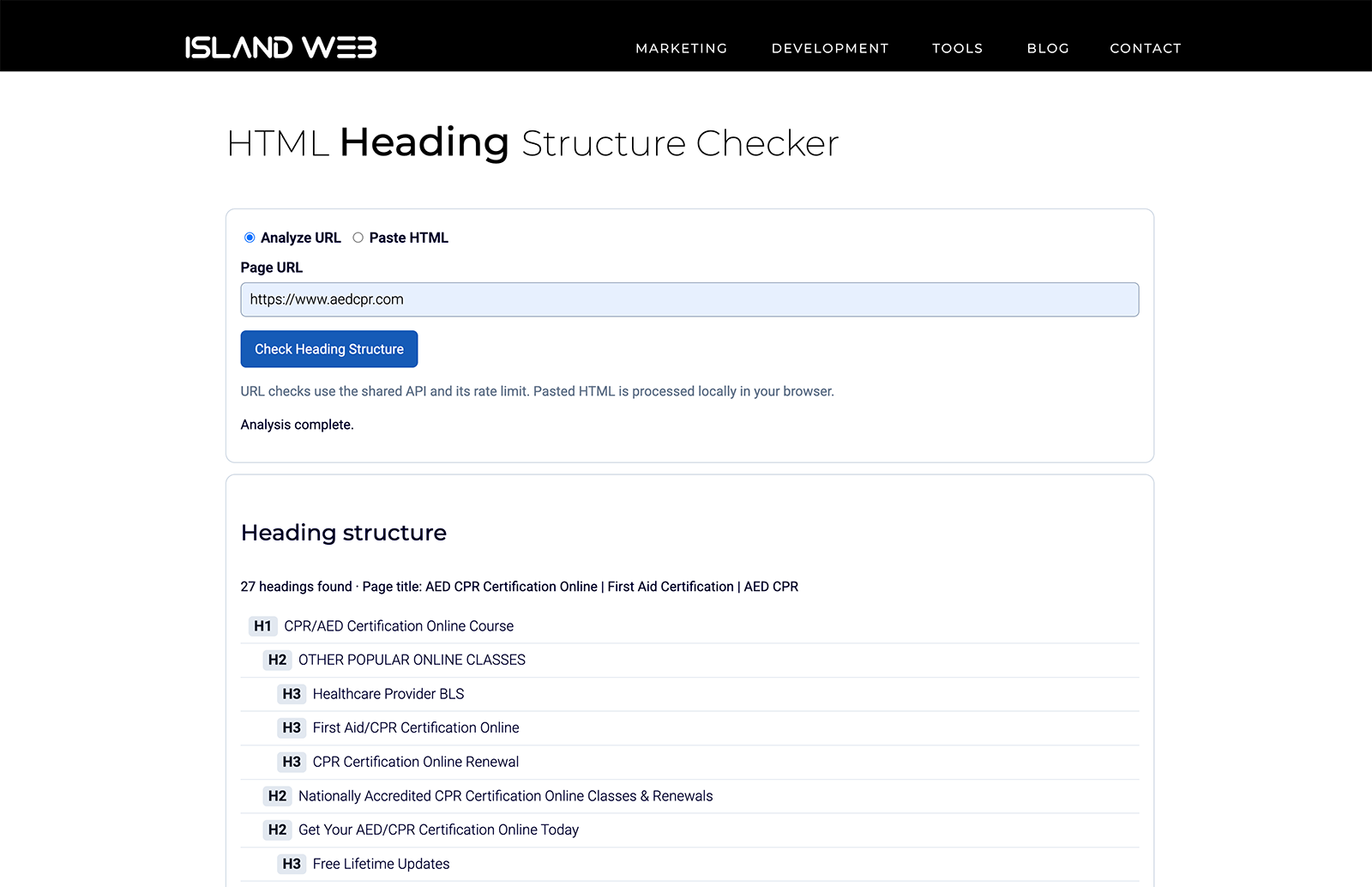
URL checks use the shared API and its rate limit. Pasted HTML is processed locally in your browser.
Heading structure
Things to review
How to Use the HTML Heading Structure Checker
Our free HTML Heading Structure Checker eliminates the need to manually search through HTML source code to examine the organization of your website's content. You can analyze an existing webpage or review HTML code before publishing it.
Follow these eight steps to evaluate your heading structure and identify potential improvements.
Step 1: Choose an Input Method
Select Webpage URL to analyze a publicly accessible webpage or HTML Source to inspect pasted HTML code.
The webpage URL option is ideal for reviewing published websites, conducting technical SEO audits, and investigating existing content structure.
The HTML source option is particularly useful for developers testing new page templates, reviewing unpublished content, or examining HTML that cannot be retrieved directly from a public URL.
Step 2: Enter a Webpage URL or Paste HTML
Enter the complete webpage URL or paste the HTML source containing the headings you want to examine.
When entering a URL, include the HTTP or HTTPS protocol and the complete path of the page you want to check.
When using HTML source, include enough of the document to represent the actual content hierarchy. Analyzing only a small fragment may produce results that differ from those of the complete webpage.
Step 3: Run the Heading Structure Check
Click Check Heading Structure to extract the HTML heading elements and examine their order and hierarchy.
The checker identifies heading elements ranging from H1 through H6, allowing you to evaluate how the page's content is organized without manually inspecting each heading.
Step 4: Review the Main H1 Heading
Review the H1 headings and determine whether the webpage has a clear primary heading that accurately identifies its main topic.
For most business websites, articles, product pages, and service pages, one descriptive primary H1 provides a straightforward way to establish the page's subject.
If the checker identifies multiple H1 elements, review their purpose before making changes. Multiple H1 headings are not automatically invalid or harmful to SEO.
Step 5: Examine the H1–H6 Heading Hierarchy
Inspect the heading levels in document order to determine whether major sections and nested subsections are organized logically.
An H2 normally introduces a major section, while an H3 introduces a subsection within that section. H4 through H6 can provide additional levels of detail when necessary.
Think of your headings as the outline of a document. Someone reviewing only the headings should be able to understand the general subject and organization of the page.
Step 6: Investigate Heading Structure Warnings
Review potential issues such as missing H1 headings, multiple H1 elements, skipped heading levels, and empty headings.
For example, moving directly from an H2 to an H4 when introducing a subsection may indicate an unnecessary gap in the heading hierarchy.
Empty headings can create confusing navigation stops for people using assistive technologies.
Remember that structural warnings require context. Moving from an H4 back to an H2 is often appropriate when ending a subsection and starting a new major section.
Step 7: Improve Heading Structure and Accessibility
Correct inappropriate heading levels, remove unnecessary empty headings, and use descriptive heading text that accurately represents each section.
Avoid selecting heading levels based on font size or appearance. CSS allows you to customize the appearance of heading elements without changing their semantic meaning.
If heading problems occur throughout your website, investigate shared templates, reusable components, content management systems, and page builders. Correcting a single template may resolve similar problems across numerous pages.
For additional accessibility guidance, use our Website Accessibility Checklist and Image Alt Text Checker.
Step 8: Run the Checker Again
Test the updated webpage or HTML source to verify your changes and perform a manual review of the resulting content structure.
Review headings whenever you publish important content, introduce new website components, update templates, or redesign existing pages.
For a more comprehensive on-page SEO review, combine heading analysis with our Meta Tags Analyzer, Google SERP Preview Tool, and Schema Markup Generator.
Understanding Your HTML Heading Structure Checker Results
Not every heading structure warning indicates invalid HTML, an accessibility violation, or an SEO problem. The purpose of heading analysis is to identify areas of your website that may benefit from further investigation.
A webpage with a logical content hierarchy should have meaningful headings that accurately describe its sections and subsections. The relationship between those headings should remain understandable even when the page is viewed without its visual styling.
When reviewing your results, consider how a visitor would navigate the content using only its headings. Would they understand the main subject? Could they easily locate a particular section? Are related topics grouped together?
Common Heading Structure Results
| Result | What It Means | Recommended Action |
|---|---|---|
| Logical heading hierarchy | Headings follow an understandable structure. | Review heading descriptions for accuracy. |
| Missing H1 | No native H1 element was detected. | Consider adding a descriptive primary heading. |
| Multiple H1 headings | More than one H1 element was detected. | Review the purpose of each H1. |
| Skipped heading level | A subsection may skip an intermediate heading level. | Examine the relationship between sections. |
| Empty heading | A heading may lack meaningful content. | Remove it or provide descriptive text. |
| Returning from H3 to H2 | A new major section may be starting. | Normally, no correction is needed. |
| No headings detected | No native H1–H6 elements were found. | Review the source and rendered HTML. |
| Vague heading text | A heading may not adequately describe its section. | Rewrite the heading for clarity. |
Some of these conditions require manual evaluation in addition to automated heading analysis.
A successful heading review involves more than correcting numbers. It involves making the entire document easier to understand and navigate.
What Is HTML Heading Structure?
HTML heading structure refers to the organization of content using the six native HTML heading elements: H1, H2, H3, H4, H5, and H6.
These elements communicate the relative levels of headings and the organization of information within a webpage.
Unlike ordinary text that has simply been made larger or bolder, HTML headings carry semantic meaning. They help browsers, assistive technologies, search engines, and other systems interpret the organization of a document.
A properly organized heading structure functions much like the chapters, sections, and subsections of a book. It provides a logical framework that allows readers to locate information and understand how different topics relate to one another.
Understanding the H1–H6 Heading Hierarchy
| Heading | Typical Purpose |
|---|---|
| H1 | Identifies the primary subject of the webpage. |
| H2 | Introduces a major section of content. |
| H3 | Introduces a subsection within an H2 section. |
| H4 | Provides additional detail within an H3 subsection. |
| H5 | Introduces a deeper level of supporting information. |
| H6 | Represents the deepest native HTML heading level. |
Not every webpage needs all six heading levels. Many business websites and blog articles can be organized effectively using only H1, H2, and H3 elements.
More complex documents, technical manuals, educational resources, and extensive product information may benefit from additional levels.
The objective is not to use as many heading levels as possible. It is to select the levels that accurately represent the organization of your content.
Why HTML Heading Structure Matters for SEO and Accessibility
A well-organized webpage benefits both human visitors and automated systems. Proper heading structure is a fundamental part of semantic HTML and professional website development.
Improved User Experience
Most visitors do not read every word of a webpage from beginning to end. Instead, they scan headings to locate the information most relevant to their needs.
Descriptive headings break lengthy content into manageable sections and make it easier for visitors to find answers, compare services, understand products, and navigate complex information.
Better Search Engine Understanding
Search engines use numerous signals to interpret webpage content. HTML headings can provide useful context about the primary subject of a page and its supporting topics.
A descriptive H1 establishes the main subject, while logically organized H2 and H3 headings help communicate the scope of the content.
Heading structure alone does not guarantee higher search rankings. However, it supports the broader goal of creating useful, understandable, and well-organized content.
Improved Website Accessibility
People who use screen readers can often navigate directly between headings or display a list of the headings available on a webpage.
Without meaningful heading structure, users may need to navigate through large amounts of unrelated content before finding the information they need.
Proper headings provide an important navigational mechanism that helps make websites more accessible.
Easier Website Maintenance
Consistent heading practices also benefit developers and content creators.
When website templates, reusable components, and content management systems follow predictable heading conventions, it becomes easier to maintain consistent content structure throughout a website.
This is particularly valuable for large business websites, ecommerce stores, educational platforms, and websites with extensive article libraries.
Examples of Correct and Incorrect HTML Heading Structure
Understanding heading hierarchy is easier when you can see how different heading levels relate to one another.
The following examples illustrate three common situations encountered during website development and technical SEO audits.
Example 1: Properly Organized Heading Hierarchy
A well-structured webpage begins with a clear main subject and organizes related information into logical sections and subsections.
Consider a webpage describing website design services. The H1 identifies the overall topic, H2 headings introduce the major sections, and H3 headings identify the individual topics within those sections.
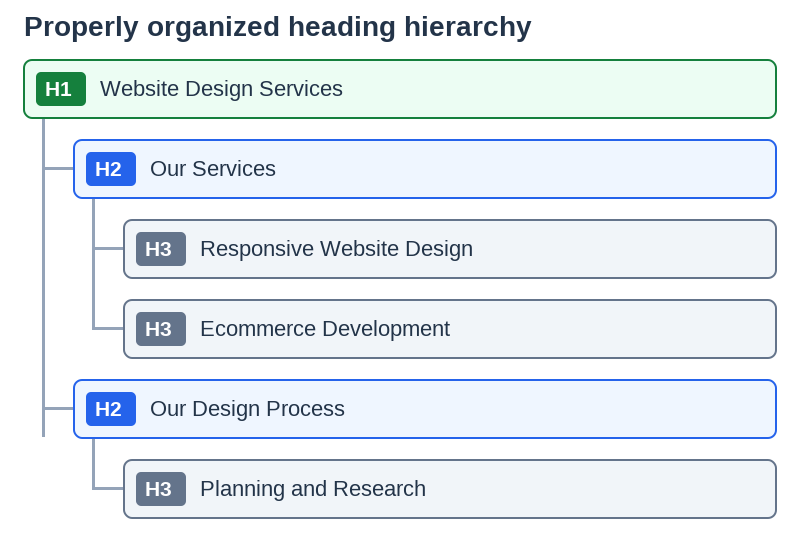
The heading structure could be written as follows:
Notice that the heading hierarchy returns from H3 to H2 when a new major section begins. This is an appropriate use of heading levels and does not represent a skipped heading problem.
The resulting structure is understandable even without visual styling, making it useful for both visitors and automated systems.
Example 2: Skipped Heading Levels
One of the most common heading structure problems occurs when developers introduce a deeper subsection without using the appropriate intermediate heading level.
For example, an H4 heading may appear directly after an H2 heading even though the content represents a subsection of that H2.
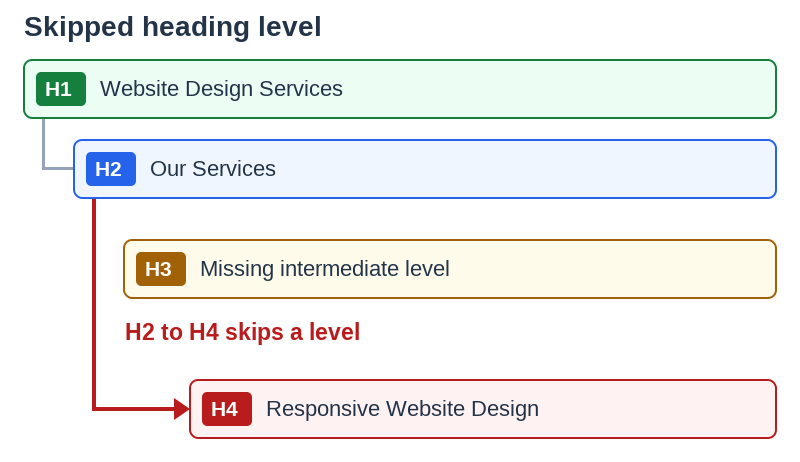
Consider the following HTML:
In this example, the H4 introduces a subsection of the H2, but the H3 level has been skipped.
A more logical structure would be:
Although skipped heading levels do not automatically result in a Google ranking penalty, unnecessary gaps can make the organization of a webpage less intuitive, particularly for people using assistive technologies.
Evaluate the relationship between sections before changing heading levels. The goal is to represent the actual content hierarchy rather than simply follow a numerical sequence.
Example 3: Choosing Heading Tags Based on Appearance
Another common mistake is selecting heading elements according to their default font size rather than their semantic purpose.
A developer might choose an H4 because the default H2 appears too large or use an H6 because it provides the desired visual appearance.
This approach confuses content structure with visual presentation.
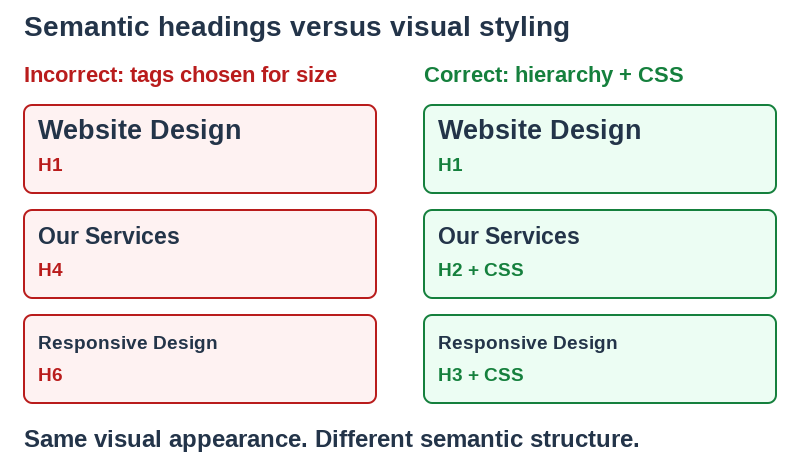
Consider the following incorrect approach:
A better approach is to use the appropriate heading levels and customize their appearance with CSS:
Both approaches can produce an identical visual design. However, the second approach preserves the logical relationship between the headings.
Modern CSS gives developers complete control over typography without sacrificing semantic HTML or accessibility.
Common HTML Heading Mistakes to Avoid
Heading structure problems are frequently introduced through website templates, content management systems, visual page builders, and inconsistent content editing practices.
Understanding these common mistakes can help prevent problems from appearing throughout your website.
Missing a Descriptive Primary H1
Although an H1 is not universally required, most content pages benefit from a clear primary heading that identifies their main subject.
A business service page should communicate what service is being offered. A product page should identify the product, and a blog article should provide a meaningful article heading.
Avoid relying exclusively on decorative banners, images containing text, or styled DIV elements to communicate the primary topic.
Using Multiple H1 Headings Without a Clear Purpose
Multiple H1 elements are permitted in HTML and do not automatically result in an SEO penalty.
However, unnecessarily using H1 elements for unrelated sections can make the primary subject of a page less obvious.
For most conventional business websites, using one primary H1 followed by logically organized H2 and H3 headings is a practical and maintainable approach.
Skipping Heading Levels
Avoid unnecessarily jumping from an H2 to an H4 or from an H3 to an H5 when introducing nested content.
Choose heading levels according to the actual relationship between sections.
Remember that returning to a higher-level heading is normal when beginning a new section.
Creating Empty Headings
Empty headings sometimes appear when content is removed from a page builder or when a website template generates a heading element without corresponding text.
These elements may create unnecessary or confusing navigation stops for assistive technology users.
Remove headings that serve no purpose or provide meaningful text where a heading is needed.
Using Vague or Repetitive Headings
Headings such as "More Information," "Details," and "Learn More" may provide little context when viewed independently.
More descriptive headings such as "Ecommerce Payment Processing Options" or "Website Maintenance and Security Updates" help visitors understand the information contained in each section.
Repeated heading text is not necessarily incorrect, but it should be reviewed when it makes sections difficult to distinguish.
Keyword Stuffing in Headings
Relevant keywords can help communicate the subject of a webpage, but excessive repetition makes headings unnatural and reduces readability.
Write headings for people first. Include relevant search terms when they accurately describe the content.
Using Headings Solely for Visual Styling
Do not choose H1–H6 elements simply because they produce a particular font size, font weight, or amount of spacing.
Use CSS to control appearance and semantic HTML to communicate structure.
Overlooking Shared Website Templates
Heading problems may originate in navigation menus, sidebars, footers, reusable cards, and other shared website components.
A single template problem can affect hundreds or thousands of pages.
When conducting a technical SEO or accessibility audit, review both the individual page content and the reusable components that appear throughout the website.
Professional Website Maintenance and Updates can help identify and correct recurring structural problems.
HTML Heading Structure and WCAG Accessibility
Properly structured HTML headings are an important component of accessible website design.
While sighted visitors can often identify sections through typography, spacing, and visual layout, people using screen readers may rely on the semantic information provided by the underlying HTML.
Screen reader users can navigate between headings, review a list of headings, or locate sections without reading an entire webpage from beginning to end.
A logical heading hierarchy makes this process more efficient.
The Web Content Accessibility Guidelines, commonly known as WCAG, include several success criteria relevant to heading structure and content organization.
WCAG Success Criterion 1.3.1: Info and Relationships — Level A
This success criterion addresses the ability to programmatically determine information, structure, and relationships communicated through visual presentation, or make them available in text.
Using semantic HTML headings is one technique for communicating content relationships to assistive technologies.
For example, text that visually introduces a major content section should generally use an appropriate heading element rather than relying entirely on large, bold text.
Learn more about WCAG 1.3.1: Info and Relationships.
WCAG Success Criterion 2.4.6: Headings and Labels — Level AA
This success criterion requires headings and labels, when provided, to describe their topic or purpose.
Correct heading levels alone are not enough. The heading text should also provide meaningful information about the content that follows.
For example, "Ecommerce Website Security" is generally more descriptive than a heading simply labeled "More Information."
Learn more about WCAG 2.4.6: Headings and Labels.
WCAG Success Criterion 2.4.10: Section Headings — Level AAA
This success criterion addresses the use of section headings to organize content.
Long articles, technical documentation, educational resources, and detailed service pages particularly benefit from descriptive sections that make information easier to locate.
Learn more about WCAG 2.4.10: Section Headings.
Native HTML Headings and ARIA
HTML provides native heading elements that communicate heading semantics to browsers and assistive technologies.
In certain situations, developers may also encounter elements that use the ARIA heading role:
When correctly implemented, this element can communicate heading semantics similar to an H2.
However, native HTML heading elements are generally preferable when available:
Native headings are simpler to implement and maintain and do not require additional ARIA attributes to establish their basic heading semantics.
A checker that examines only native H1–H6 elements may not report headings implemented using ARIA. These elements should be reviewed separately during a comprehensive accessibility audit.
Does a Correct Heading Structure Guarantee WCAG Compliance?
No. Accessibility involves many additional considerations, including keyboard navigation, accessible forms, color contrast, alternative text, focus management, and accessible interactive components.
An automated heading checker can identify potential structural issues, but it cannot determine complete WCAG compliance.
Use our Website Accessibility Checklist, Color Contrast Checker, and Image Alt Text Checker to investigate other important aspects of website accessibility.
How HTML Heading Structure Supports SEO, AEO and GEO
Search technology continues to evolve. In addition to traditional search engines such as Google and Bing, consumers increasingly use AI-powered platforms to find information, compare products, and research businesses.
A well-organized webpage helps communicate the relationship between its primary subject, supporting topics, and individual sections.
Semantic HTML headings provide a standardized way to express this organization.
Heading Structure and Search Engine Optimization (SEO)
Descriptive HTML headings help establish context for the information contained within a webpage.
An H1 can identify the primary subject, while H2 and H3 headings introduce supporting topics and related information.
For example, a comprehensive webpage about ecommerce development might include sections about:
- Shopping cart integration
- Payment processing
- Mobile-friendly website design
- Ecommerce website security
- Product search engine optimization
- Website performance
This structure allows a business to cover its services comprehensively while keeping the information easy to navigate.
Rather than repeating the same keyword in every heading, focus on using natural language that accurately describes each section.
Heading optimization should be combined with other important SEO practices, including descriptive title tags, useful content, appropriate internal links, and sound technical website development.
Heading Structure and Answer Engine Optimization (AEO)
Answer Engine Optimization focuses on making information useful to systems that provide direct answers to questions.
Organizing content into clearly identified sections can make relevant information easier to locate and interpret.
Question-based headings can be particularly useful when they introduce genuine answers to common customer questions.
For example, a website development company might include headings such as:
- How Much Does an Ecommerce Website Cost?
- What Is the Difference Between Custom Development and WordPress?
- How Long Does It Take to Build a Business Website?
- Why Are Website Security Updates Important?
Each heading introduces a specific subject that can be addressed directly in the content that follows.
However, question-based headings should be used where they naturally fit the content rather than forcing every section into a question-and-answer format.
Heading Structure and Generative Engine Optimization (GEO)
Generative Engine Optimization considers how website content may be discovered, interpreted, and referenced by AI-powered platforms.
Clear headings, descriptive sections, consistent terminology, and well-organized supporting information can contribute to content that is understandable to both people and automated systems.
A logical structure may make it easier for systems that process webpage content to identify relevant sections and distinguish supporting information from unrelated topics.
However, AI platforms use different methods to retrieve and process information. No specific heading structure guarantees inclusion in AI-generated answers, citations, or recommendations.
Website accessibility, crawlability, content accuracy, authority, and other technical and editorial considerations remain important.
Combining Semantic HTML With Structured Data
HTML headings and Schema.org structured data serve complementary purposes.
Headings organize the visible content of a webpage, while structured data communicates additional machine-readable information about the page, its subject, and relevant entities.
For example, an ecommerce product page may use HTML headings to organize product specifications, features, shipping information, and frequently asked questions.
Product structured data can provide additional information about the product's name, price, availability, and other supported properties.
Both semantic HTML and structured data should accurately represent the information available to website visitors.
Use our free Schema Markup Generator to create JSON-LD structured data for your website.
At Island Web Studios, we combine semantic web development, Technical SEO, structured data, Content Marketing, and SEO, AEO and GEO services to help businesses build more accessible and understandable websites.
Understanding the Limitations of Heading Structure Checking
Automated heading analysis is useful for identifying structural patterns, but it cannot determine whether every heading accurately describes its associated content.
Understanding these limitations is important when interpreting the results of any automated website analysis tool.
Dynamically Generated Website Content
Modern websites frequently use JavaScript to generate or modify content after a webpage loads.
Frameworks such as React, Vue.js, and other client-side technologies may introduce headings that are not present in the original server-returned HTML.
If URL-based analysis retrieves only the initial HTML response, these dynamically generated headings may not appear in the results.
When necessary, inspect the rendered page using your browser's developer tools and copy the relevant HTML into the checker.
Websites That Restrict Automated Requests
Some websites use security systems, authentication requirements, firewalls, or bot protection services that prevent automated tools from retrieving webpage content.
If the checker cannot retrieve a webpage, try using the HTML source input method instead.
A failed request does not necessarily indicate that a webpage is inaccessible to visitors or search engines.
Heading Quality Requires Human Evaluation
An automated checker may identify the number, order, and text of heading elements, but it cannot reliably determine whether every heading provides the most appropriate description of its content.
A technically correct heading hierarchy can still contain vague, misleading, or poorly written headings.
Review the content manually to ensure that each heading communicates a useful and accurate subject.
HTML Source Versus the Accessibility Tree
The headings present in HTML source code do not always correspond exactly to the headings exposed to assistive technologies.
CSS visibility rules, ARIA attributes, dynamically generated content, and other implementation details can affect the browser's accessibility tree.
For comprehensive accessibility testing, combine HTML heading analysis with browser accessibility inspection tools and manual testing.
Heading Analysis Is Not a Complete SEO Audit
A logical heading structure is only one component of an effective website.
Search visibility also depends on content quality, crawlability, indexing, website performance, internal linking, authority, and many other factors.
Use the HTML Heading Structure Checker alongside our other Free Web Tools to conduct a more comprehensive website review.
Frequently Asked Questions About HTML Headings
What is an HTML heading structure checker?
An HTML heading structure checker examines H1–H6 elements and identifies structural patterns that may require attention, including missing, empty, or incorrectly sequenced headings.
The Island Web Studios HTML Heading Structure Checker allows you to review the organization of your content without manually searching through HTML source code.
Why are HTML headings important for SEO?
Headings provide context about the subjects covered by a webpage and the relationships between its sections. A logical structure supports content understanding but does not guarantee higher search rankings.
Descriptive headings also improve readability and help visitors locate relevant information.
Should every webpage have an H1 tag?
Although an H1 is not universally mandatory, most content pages benefit from a descriptive main heading that identifies the primary subject.
For most business websites, service pages, product pages, and articles, one primary H1 is a practical approach.
Can a webpage have more than one H1 heading?
Yes. Multiple H1 elements are permitted in HTML and do not automatically create an SEO penalty. A single primary H1 is often the simplest way to communicate the main subject of a page.
If multiple H1 headings are present, evaluate whether they accurately represent the organization of the content.
What is the difference between H1, H2, and H3?
H1 normally identifies the main subject, H2 identifies principal sections, and H3 identifies subsections within those sections. H4 through H6 provide deeper levels of organization.
These heading levels communicate semantic hierarchy rather than simply defining font sizes.
Is skipping heading levels bad for SEO?
Skipped heading levels are not necessarily a search ranking penalty, but unnecessary downward jumps in the hierarchy can make content more difficult to navigate and understand.
Avoid skipping intermediate heading levels when introducing nested subsections, particularly when doing so could obscure the relationship between sections.
Do headings need to contain keywords?
Headings should accurately describe their sections. Relevant search terms can be included naturally when they improve clarity, but keyword stuffing should be avoided.
Focus on descriptive, useful headings rather than repeatedly inserting the same target keyword.
Can I use CSS to change the appearance of heading tags?
Yes. CSS controls heading presentation independently of semantic heading level. Select heading elements according to content hierarchy rather than their default font size.
You can customize font size, font weight, color, spacing, and other visual properties without changing the semantic purpose of the heading.
Are HTML headings important for accessibility?
Yes. Meaningful headings provide a way to navigate content and help users, including people using screen readers, locate relevant sections efficiently.
Logical heading levels and descriptive heading text are important considerations when developing accessible websites.
Should I use heading tags for navigation menus or footer text?
Use headings when they identify genuine content sections, including appropriate sections within navigation or footer areas. Do not select heading elements solely for their visual styling.
For example, a footer containing separate sections for contact information, services, and useful links may benefit from meaningful headings.
Does the HTML Heading Structure Checker work with any website?
The checker supports many public webpages and pasted HTML. Automated request restrictions and headings created by JavaScript may limit URL-based analysis.
If a webpage cannot be retrieved, try copying its HTML into the HTML Source option.
How often should I check my website's heading structure?
Review headings when publishing content, modifying templates, redesigning pages, or making significant website updates. Periodic reviews can uncover structural problems introduced over time.
Regular heading checks are particularly useful for websites with multiple content editors or frequently updated templates.
Is the HTML Heading Structure Checker free?
Yes. The Island Web Studios HTML Heading Structure Checker is a free online tool that allows you to analyze headings from a webpage URL or pasted HTML source.
Can I check the heading structure of an unpublished webpage?
Yes. Select the HTML Source option and paste your HTML code into the checker. This allows you to review headings in new pages, templates, and website components before publishing them.
Does the HTML Heading Structure Checker detect headings generated by JavaScript?
URL-based analysis may not include headings generated dynamically after the webpage loads. If necessary, use your browser's developer tools to copy the rendered HTML and analyze it using the HTML Source option.
Is it acceptable to go from an H3 heading back to an H2?
Yes. Returning to a higher-level heading is appropriate when you finish a subsection and begin a new major section. This is different from unnecessarily skipping levels when introducing deeper subsections.
Is an H1 heading the same as an SEO title tag?
No. An H1 is a heading within the webpage's content. The HTML title element provides the document's title and may influence the title displayed in search results and browser tabs.
Both should accurately represent the page, but they do not need to be identical.
Use our Google SERP Preview Tool to review how your SEO title and meta description may appear in search results.
Can I use a DIV element instead of an HTML heading?
A DIV element does not provide native heading semantics. Although ARIA attributes can identify an element as a heading, using native H1–H6 elements is generally preferable when possible.
Does having an incorrect heading hierarchy mean my website fails WCAG?
Not necessarily. Heading structure must be evaluated in context. Incorrectly represented relationships and headings that do not describe their content may create accessibility issues, but a heading checker alone cannot establish whether a webpage conforms to WCAG.
Is there a maximum number of H2 or H3 headings allowed on a webpage?
There is no universal SEO limit on the number of H2 or H3 headings. Use as many as are appropriate to organize your content logically.
A long article, educational resource, or technical document may naturally contain many headings and subsections.