Inspect website response headers with our free HTTP Headers Checker. Analyze HTTP status codes, security headers, caching directives, content types, compression settings, and final destination URLs.
Whether you're troubleshooting a website, investigating security configurations, optimizing performance, or conducting a technical SEO audit, our HTTP Headers Checker helps you understand how your web server responds to incoming requests.
Identify potential configuration problems and verify the headers returned by your web server, application, CDN, or hosting provider.
Inspect response headers, HTTP status codes, and the final destination after redirects.
How to Use the HTTP Headers Checker
Our free HTTP Headers Checker makes it easy to inspect server responses without using command-line utilities or browser developer tools.
Step 1: Enter Your Website URL
Enter the complete publicly accessible URL you want to analyze, including the HTTP or HTTPS protocol. You can test webpages, images, stylesheets, JavaScript files, and public API endpoints.
Step 2: Run the HTTP Headers Check
Click Check URL to request the submitted address and retrieve its HTTP response information.
Step 3: Review the HTTP Status and Final URL
Examine the response status code and final destination. Verify that the request reached the intended resource and returned the expected response.
Step 4: Examine the Response Headers
Review the returned HTTP headers. Pay particular attention to content types, caching directives, compression, server information, and any unexpected header values.
Step 5: Inspect Website Security Headers
Look for security-related headers such as Content-Security-Policy, Strict-Transport-Security, X-Content-Type-Options, X-Frame-Options, Referrer-Policy, and Permissions-Policy. Evaluate their configuration according to your website's requirements.
Step 6: Review Caching and SEO Directives
Examine Cache-Control, ETag, Last-Modified, X-Robots-Tag, and any canonical declarations communicated through HTTP Link headers.
Step 7: Correct Configuration Problems and Test Again
Update the appropriate server, CDN, or application settings and repeat the analysis. Use Reset to clear the current results before testing another resource.
What Are HTTP Response Headers?
HTTP response headers are fields returned by a web server alongside its response status and, when applicable, response body.
They communicate information about the requested resource and provide instructions to browsers, caches, proxies, and automated crawlers.
Headers can influence website security, performance, content interpretation, caching, and search engine indexing.
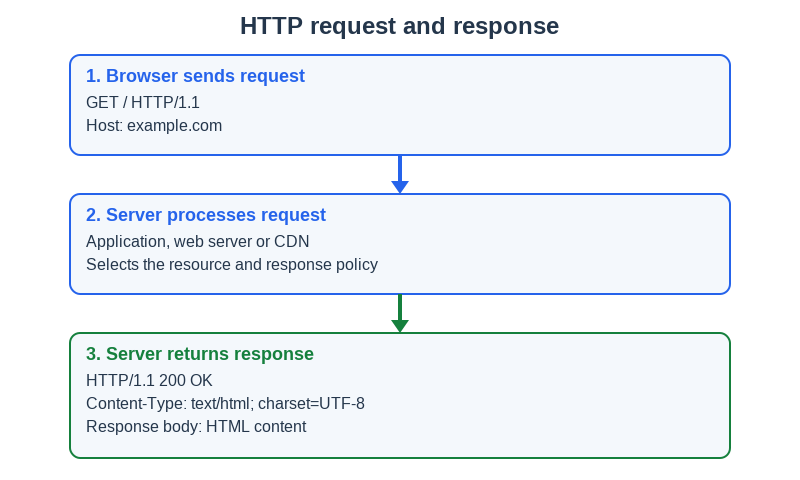
Unlike visible webpage content, HTTP headers are exchanged at the protocol level. Developers can inspect them using browser developer tools, command-line utilities such as cURL, or an online HTTP Headers Checker.
Request Headers vs. Response Headers
Request headers travel from the client to the server. They may describe accepted media types, supported compression methods, browser information, or authentication credentials.
Response headers travel from the server to the client and describe the returned resource and how it should be handled.
Understanding Common HTTP Response Headers
| Header | Purpose |
|---|---|
| Content-Type | Identifies the returned media type and optional character encoding. |
| Content-Length | Indicates the response content length in bytes when applicable. |
| Content-Encoding | Identifies compression or other content encodings. |
| Cache-Control | Defines caching and revalidation instructions. |
| ETag | Provides a validator for a particular representation. |
| Last-Modified | Indicates when a resource was last modified. |
| Location | Identifies a redirect or other related destination. |
| Vary | Identifies request headers that affect response selection. |
| Server | May identify responding server software. |
| Set-Cookie | Provides instructions for storing cookies. |
| Link | Communicates resource relationships, including canonical URLs. |
| X-Robots-Tag | Provides search engine indexing and presentation directives. |
Not every response requires every header. Appropriate configurations depend on the resource and intended application behavior.
Understanding HTTP Status Codes
HTTP status codes summarize the outcome of a request.
| Status | Meaning |
|---|---|
| 200 OK | The request succeeded. |
| 301 Moved Permanently | The resource has permanently moved. |
| 302 Found | A temporary redirect is being communicated. |
| 304 Not Modified | A cached representation can be reused under the applicable conditional request. |
| 403 Forbidden | The server refuses access. |
| 404 Not Found | The requested resource could not be found. |
| 429 Too Many Requests | A request rate limit has been reached. |
| 500 Internal Server Error | The server encountered an unexpected problem. |
| 503 Service Unavailable | The server is temporarily unable to handle the request. |
The Headers Checker focuses on response headers and the final destination. Use our HTTP Redirect Checker to investigate individual redirect hops and redirect loops.
Essential HTTP Security Headers
Security headers help supporting web browsers enforce policies that reduce exposure to common web-based attacks.
Content-Security-Policy (CSP)
Content Security Policy defines which scripts, styles, images, fonts, frames, and other resources a webpage may use.
A carefully configured CSP can reduce the risk of cross-site scripting and unauthorized resource loading. However, overly restrictive policies may prevent legitimate applications and third-party integrations from functioning.
Consider using Content-Security-Policy-Report-Only to evaluate a proposed policy before enforcement.
Strict-Transport-Security (HSTS)
HSTS instructs supporting browsers to use HTTPS for subsequent requests to a website for a specified period.
Example: Strict-Transport-Security: max-age=31536000
The includeSubDomains directive extends the policy to subdomains. Verify HTTPS support across applicable subdomains before enabling it.
X-Content-Type-Options
The nosniff directive helps prevent browsers from interpreting certain resources as a different media type from the one declared by the server.
It is particularly important when serving scripts and stylesheets.
X-Frame-Options
This header helps protect against clickjacking by controlling whether a webpage may be displayed inside a frame.
Common values include DENY and SAMEORIGIN. The CSP frame-ancestors directive provides more flexible control in modern browsers.
Referrer-Policy
Referrer-Policy controls how much referring URL information is transmitted when a browser makes subsequent requests.
The strict-origin-when-cross-origin policy provides a useful balance between privacy and referral information for many websites.
Permissions-Policy
Permissions-Policy controls access to selected browser features, including cameras, microphones, and geolocation.
Restrict features that your website does not require, while preserving legitimate application functionality.
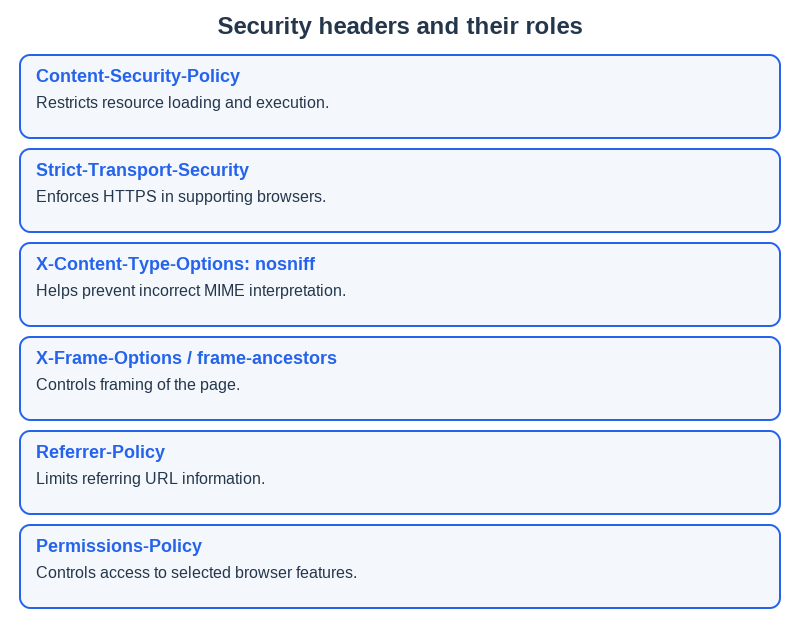
Security headers are only one component of website protection. Their presence does not establish that a website is free from vulnerabilities.
HTTP Headers, Caching and Website Performance
Effective caching reduces unnecessary network requests and can improve website loading performance.
Understanding Cache-Control
| Directive | Meaning |
|---|---|
| public | Allows shared caching when other requirements permit it. |
| private | Prevents shared caches from storing the response. |
| max-age | Specifies how long a response remains fresh. |
| s-maxage | Specifies freshness lifetime for shared caches. |
| no-cache | Requires validation before a stored response is reused. |
| no-store | Instructs caches not to store the response. |
| immutable | Indicates that a fresh response is not expected to change. |
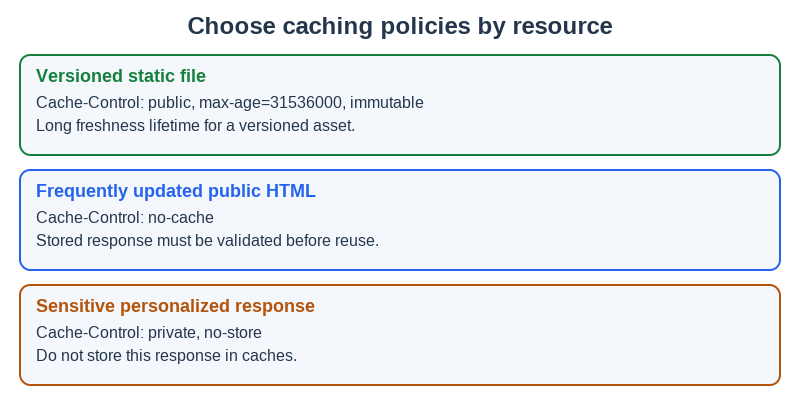
Versioned static resources can often use long cache lifetimes, while frequently changing or personalized content requires different policies.
ETag and Last-Modified
These headers can support conditional requests. If a stored representation remains valid, the server may return a 304 Not Modified response instead of transferring the resource again.
Gzip and Brotli Compression
The Content-Encoding header identifies content encodings such as gzip and Brotli.
Compressing suitable text resources can reduce transfer sizes. The Vary header may also help caches distinguish responses based on supported encodings.
Header inspection alone does not measure complete page loading performance or Core Web Vitals.
Content Types and Character Encoding
The Content-Type header tells browsers how to interpret the returned resource.
Common media types include:
| Resource | Content-Type |
|---|---|
| HTML | text/html |
| CSS | text/css |
| JavaScript | text/javascript |
| JSON | application/json |
| XML | application/xml |
| SVG | image/svg+xml |
| PNG | image/png |
| WebP | image/webp |
| application/pdf |
An HTML response may also specify UTF-8 character encoding.
Incorrect media types can prevent resources from loading correctly, particularly when browser MIME-type protections are enabled.
How HTTP Headers Affect SEO, AEO and GEO
HTTP response headers provide technical information that search engines and other automated retrieval systems may use when accessing website content.
X-Robots-Tag and Search Engine Indexing
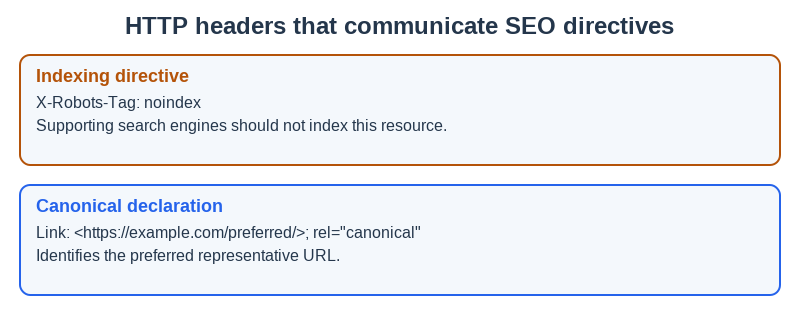
The X-Robots-Tag header communicates indexing directives without requiring an HTML robots meta tag.
For example:
X-Robots-Tag: noindex
This directive can be useful for resources such as PDF documents. However, accidentally applying it to important public webpages may prevent their inclusion in supporting search engines.
HTTP Canonical Headers
Canonical declarations can also be provided through the HTTP Link header.
For example:
Link: <https://example.com/preferred-page/>; rel="canonical"
This method is especially useful for non-HTML resources.
Use our Canonical URL Checker and Website Meta Tags Analyzer to investigate canonical declarations and indexing directives in more detail.
Can Security Headers Block Search Engines or AI Crawlers?
Most browser security headers do not directly prohibit automated systems from requesting public website content.
For example, X-Frame-Options restricts framing, while Content-Security-Policy governs resource access and execution in supporting browser environments.
However, restrictive CSP configurations can interfere with rendering when required resources are blocked. Authentication, firewall rules, bot protection, rate limiting, robots.txt rules, and unsuccessful HTTP responses may also restrict retrieval.
Review both server responses and rendered page behavior when investigating crawler accessibility.
A technically accessible website provides a stronger foundation for SEO, Answer Engine Optimization (AEO), and Generative Engine Optimization (GEO), but does not guarantee indexing or AI-generated citations.
CDNs, Reverse Proxies and Server Configuration
Websites frequently use content delivery networks, reverse proxies, web application firewalls, and application frameworks that modify HTTP responses.
A header returned to a visitor may differ from the value configured on the origin server.
Provider-specific cache headers and fields such as Age or Via can sometimes help identify intermediary behavior.
If a configuration change appears ineffective, investigate which layer controls the header, whether an older cached response is being served, and whether multiple systems are setting conflicting values.
Common HTTP Header Problems
| Problem | Recommended Action |
|---|---|
| Incorrect Content-Type | Configure the correct media type for the resource. |
| Outdated content being served | Review browser and CDN caching policies. |
| Personalized content cached publicly | Correct shared caching restrictions. |
| Unexpected noindex directive | Review application and server indexing settings. |
| Missing security policy | Determine which protection is appropriate. |
| Overly restrictive CSP | Review blocked resources and test policy changes. |
| Conflicting header values | Identify which layers generate the headers. |
| Unexpected redirect destination | Investigate server routing and redirect rules. |
| Uncompressed text resources | Review compression support and negotiation. |
Understanding the Tool's Limitations
The HTTP Headers Checker provides a snapshot of the response returned to its public HTTP request.
Responses may vary according to cookies, authentication, geographic location, request methods, compression negotiation, and automated request restrictions.
The checker does not provide a complete vulnerability assessment, authenticated-session audit, browser-rendering test, or comprehensive performance benchmark.
Avoid sharing sensitive cookie values, authentication tokens, or session identifiers when documenting HTTP responses.
Frequently Asked Questions
What is an HTTP headers checker?
An HTTP headers checker retrieves a public URL and displays its response headers, HTTP status information, and final destination.
Is the HTTP Headers Checker free?
Yes. The Island Web Studios HTTP Headers Checker is a free online tool for inspecting website response headers.
Are HTTP headers visible to website visitors?
Yes. Although normally absent from the visible page, response headers can be inspected using browser developer tools and HTTP analysis software.
Can I check website security headers?
Yes. The tool displays returned security-related headers for inspection. It does not perform a complete website security assessment.
What security headers should my website use?
Common protections include CSP, HSTS, X-Content-Type-Options, framing restrictions, Referrer-Policy, and Permissions-Policy. Appropriate configurations depend on your website.
What is Content-Security-Policy?
CSP defines restrictions on resource loading, script execution, and other browser behaviors. It can help mitigate certain web-based attacks.
What is HSTS?
HTTP Strict Transport Security instructs supporting browsers to use HTTPS for subsequent requests to the applicable hostname.
Does X-Frame-Options block Google or AI crawlers?
Not directly. X-Frame-Options controls whether supporting browsers may embed a page in a frame. It does not ordinarily prevent public HTTP requests.
Can HTTP headers prevent search engine indexing?
Yes. Supporting search engines may respect indexing directives communicated through X-Robots-Tag headers. Authentication and unsuccessful HTTP responses can also affect indexing.
What is the difference between no-cache and no-store?
No-cache permits storage but requires validation before reuse. No-store instructs caches not to store the response.
What is the difference between Content-Type and Content-Encoding?
Content-Type identifies the underlying media type. Content-Encoding describes encodings applied to that content, such as gzip compression.
Does a 200 OK response mean my website is working correctly?
Not necessarily. It indicates HTTP request success, but the returned content may still contain application errors, security problems, or indexing restrictions.
Why are some HTTP headers missing?
Some headers are optional or only appropriate for particular resources. Servers, applications, and intermediary systems may also remove or modify headers.
Why do the results differ from my server configuration?
CDNs, proxies, caches, and application code may modify response headers before they reach the checker.
Does this tool display every redirect hop?
The Headers Checker focuses on response headers and the final URL. Use our HTTP Redirect Checker for detailed redirect-chain analysis.
Can I inspect an API endpoint?
Yes. Public HTTP endpoints can be inspected within the tool's request limits. Authenticated endpoints and custom HTTP methods may require dedicated testing software.
Can HTTP headers improve website performance?
Appropriate caching and compression settings can reduce repeated requests and transferred data, potentially improving loading performance.
How often should I check my website's HTTP headers?
Review them after hosting changes, CDN updates, security policy changes, website deployments, and during routine website maintenance.
Related Free SEO and Website Development Tools
- HTTP Redirect Checker
- Canonical URL Checker
- Website Meta Tags Analyzer
- Robots.txt Generator
- Broken Link Checker
- XML Sitemap Validator
Explore our complete collection of Free Website Development and SEO Tools.
Need Professional Website Security or Technical SEO Assistance?
Correctly configuring HTTP headers requires an understanding of server technology, browser behavior, website security, and search engine requirements.
Island Web Studios provides a one-stop solution for Full Stack Web Development, Website Maintenance, Technical SEO, and SEO, AEO and GEO services.
With three decades of website development experience, we help businesses build and maintain secure, efficient, and technically sound websites.
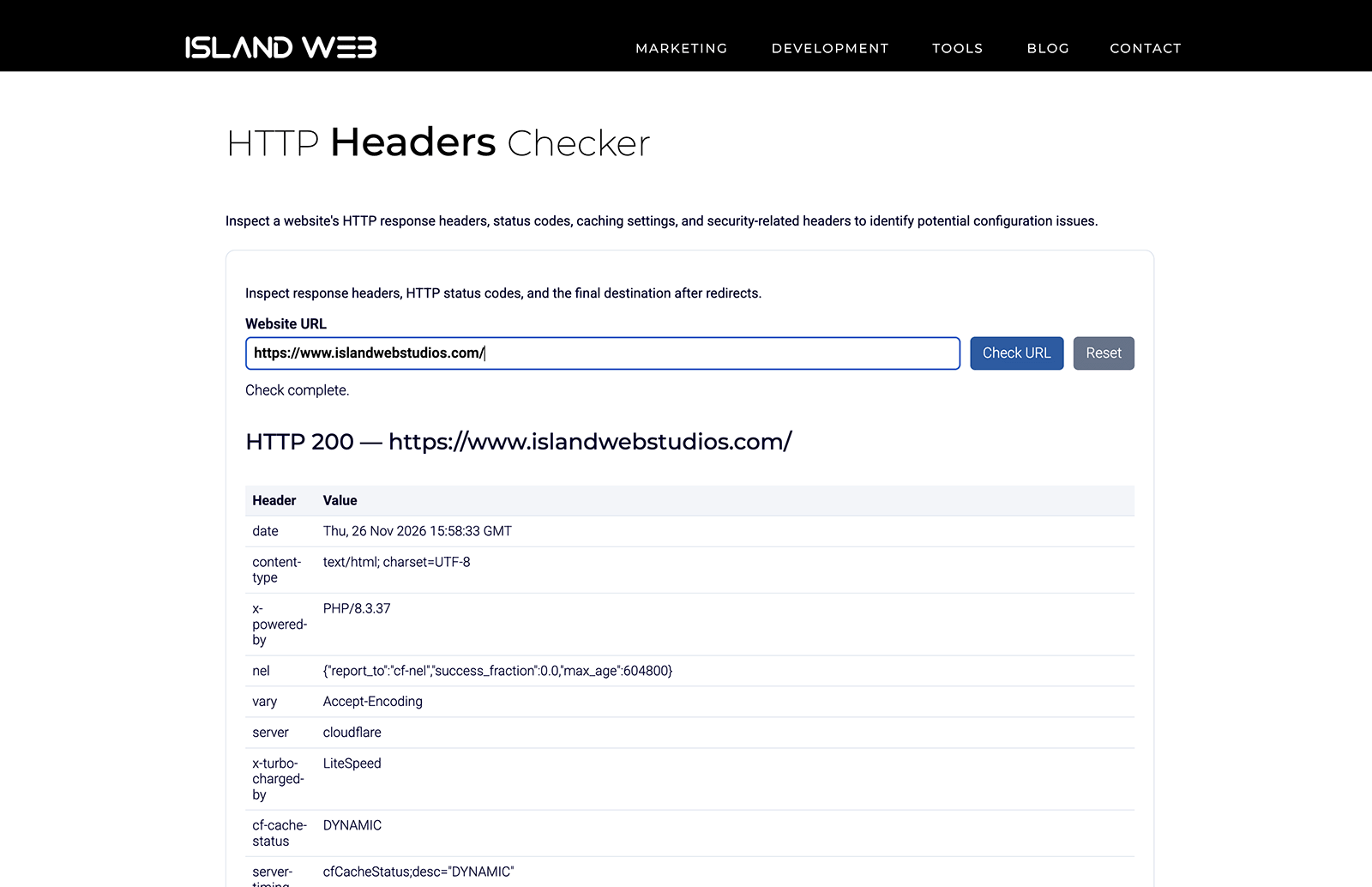
Inspect HTTP response headers, security policies, caching directives, and server configuration with the free Island Web Studios HTTP Headers Checker.