Analyze website redirects with our free HTTP Redirect Checker and Redirect Chain Analyzer. Test individual URLs or multiple addresses, visualize redirect chains, detect redirect loops, inspect HTTP response headers, and identify potential technical SEO problems.
Automatically test HTTP, HTTPS, www, and non-www URL variations to investigate inconsistent website routing. Examine final destination URLs, canonical declarations, robots directives, response times, and potential client-side redirects.
Whether you're managing a website migration, troubleshooting server configurations, conducting a technical SEO audit, or maintaining an existing website, our HTTP Redirect Checker provides detailed diagnostic information and practical recommendations. Download your results as a CSV report for further analysis and documentation.
Up to eight distinct URLs and 24 outbound requests per batch. Only public HTTP/HTTPS websites are supported.
How to Use the HTTP Redirect Checker
Our free HTTP Redirect Checker allows you to analyze individual website addresses, check multiple URLs, visualize redirect chains, inspect HTTP response headers, and identify potential server configuration and technical SEO problems.
Step 1: Enter Your Website URLs
Enter the website addresses you want to analyze in the Website URLs field. You can enter a single URL or up to five URLs, with each address on a separate line.
Include the HTTP or HTTPS protocol when testing a specific version of an address. If you omit the protocol, the tool will use HTTPS by default.
Step 2: Enable Automatic URL Variation Testing
Select the option to test HTTP, HTTPS, www, and non-www variations if you want to investigate how different versions of your website address are handled.
This feature is particularly useful when configuring SSL certificates, changing your preferred hostname, or investigating duplicate URL problems.
For example, entering https://www.example.com/services/ allows you to investigate the following variations:
- http://example.com/services/
- https://example.com/services/
- http://www.example.com/services/
- https://www.example.com/services/
Ideally, all alternative versions of a webpage should lead to the appropriate preferred address.
Step 3: Analyze Your URLs
Click Analyze URLs to begin the analysis.
The tool requests each submitted address, examines its HTTP response, and follows supported redirects until it reaches a final response, encounters an error, or reaches a request limit.
Each analyzed URL receives its own results panel.
Step 4: Review the Redirect Health Summary
Review the summary displayed at the top of each result panel.
The summary includes the number of redirect responses, the last HTTP status code received, total HTTP request time, and overall diagnostic status.
The health summary helps you identify which URLs require additional investigation. A result with no detected issues does not necessarily mean that the webpage is fully optimized or indexable.
Step 5: Examine the Visual Redirect Chain
Follow the visual redirect path to see how the original address leads to subsequent URLs.
Each step displays the requested URL, HTTP status code, response time, and Location header when available.
Look for unnecessary intermediate redirects, repeated addresses, unexpected hostname changes, and unsuccessful final responses.
Step 6: Inspect HTTP Response Headers
Expand the Response Headers section beneath any step in the redirect path to examine the headers returned by the server.
These headers can provide useful information about redirect destinations, caching policies, content types, server configuration, security settings, and indexing directives.
For a more focused examination of response headers, use our HTTP Headers Checker.
Step 7: Review Final Destination SEO Signals
When the analysis reaches a final response, the tool examines available canonical declarations and robots directives.
Review the reported information to determine whether the destination's canonical URL and indexing instructions are consistent with your intended website configuration.
The tool can also identify HTML meta refresh instructions, HTTP Refresh headers, and possible JavaScript redirect instructions that may cause additional navigation in a web browser.
Step 8: Investigate Diagnostic Warnings
Review the diagnostic warnings and recommendations associated with each URL.
The checker can identify potential problems such as multiple redirect hops, redirect loops, HTTPS downgrades, changed hostnames, modified query strings, unsuccessful HTTP responses, multiple canonical declarations, and noindex directives.
Not every warning represents an error. Evaluate each finding according to the intended behavior of your website.
Step 9: Download Your Redirect Analysis Report
Click Download CSV to export the analysis results.
The CSV report includes requested URLs, individual redirect steps, HTTP status codes, Location headers, response times, final destinations, diagnostic warnings, errors, canonical declarations, and robots information.
Open the report in Microsoft Excel, Google Sheets, or another spreadsheet application to document website migrations, compare redirect configurations, or organize technical SEO corrections.
Step 10: Correct Redirect Problems and Test Again
Update the appropriate redirect rules in your web server, content delivery network, content management system, or application.
Run the checker again to verify your changes.
Use the Reset button to clear the current inputs and results before beginning a new analysis.
Understanding Your HTTP Redirect Checker Results
A successful website redirect involves more than reaching a destination that loads in a browser. The number of intermediate requests, HTTP status codes, response times, canonical declarations, and indexing directives can reveal problems that are otherwise difficult to identify.
Our HTTP Redirect Checker organizes this information into several diagnostic sections.
Redirect Health Summary
The redirect health summary provides an overview of the analysis.
| Result | Description |
|---|---|
| Redirect Responses | The number of supported HTTP redirect responses encountered during the analysis. |
| Last HTTP Status | The most recent HTTP status code returned by the server. |
| Total Request Time | The combined measured response times of the recorded HTTP requests. |
| Health | Indicates whether the analysis encountered errors, diagnostic warnings, or no detected issues. |
A final 200 OK response indicates that the HTTP request succeeded, but it does not guarantee that the destination contains the correct content or is eligible for search engine indexing.
Visual Redirect Path
The visual redirect path displays the sequence of requests made during the analysis.
Instead of manually inspecting individual server responses, you can follow each redirect from the original address to the final response.
This is especially useful when several technologies control website routing, such as Apache, Nginx, Cloudflare, WordPress, application frameworks, and custom PHP redirect rules.
HTTP Response Headers
Every recorded request includes expandable HTTP response headers.
Some of the most useful headers when investigating redirects include:
| HTTP Header | Purpose |
|---|---|
| Location | Identifies the destination of an HTTP redirect. |
| Content-Type | Describes the type of content returned by the server. |
| Cache-Control | Provides instructions concerning response caching. |
| Strict-Transport-Security | Instructs supporting browsers to use HTTPS under specified conditions. |
| Link | May contain an HTTP canonical declaration or other resource relationships. |
| X-Robots-Tag | Provides indexing and other search-related directives. |
| Refresh | May instruct a browser to reload or navigate to another address. |
| Server | May provide information about the responding server technology. |
The presence and values of these headers depend on the responding server, CDN, and application configuration.
Destination SEO Signals
When the checker reaches a final response, it examines available metadata and HTTP headers for additional SEO information.
This includes HTML canonical tags, HTTP canonical declarations, general robots meta tags, selected crawler-specific robots directives, and X-Robots-Tag headers.
Review these signals alongside the final destination URL. A successful redirect can still lead to a webpage with an unexpected canonical declaration or indexing restriction.
Diagnostics and Recommendations
The diagnostic section highlights conditions that may require further investigation.
| Finding | Recommended Action |
|---|---|
| Multiple redirect hops | Consolidate unnecessary redirects where practical. |
| Redirect loop | Investigate conflicting server, CDN, or application rules. |
| Missing or ambiguous Location header | Correct the redirect response configuration. |
| Final 404 response | Correct the destination or restore the missing resource. |
| Final 5xx response | Investigate server or upstream service errors. |
| HTTPS downgrade | Verify why a secure address redirects to an insecure address. |
| Hostname changed | Confirm that the hostname change is intentional. |
| Query string changed | Check whether tracking, filtering, or application parameters were unintentionally modified. |
| Multiple canonical declarations | Compare the declared canonical destinations for consistency. |
| Canonical destination differs | Determine whether the canonical declaration is intentional. |
| Noindex directive detected | Review the directive and its intended crawler scope. |
| Refresh instruction detected | Inspect the destination in a web browser for additional navigation. |
| Possible JavaScript redirect | Verify the behavior using browser developer tools. |
| Request limit reached | Investigate long redirect chains or repeat the test with fewer URLs. |
| Response truncated | Review the complete destination separately because metadata inspection may be incomplete. |
Diagnostic warnings are intended to assist developers and website owners. They should not be interpreted as an automatic SEO penalty or a complete assessment of website health.
What Is an HTTP Redirect?
An HTTP redirect is a server response that instructs a web browser, search engine crawler, or another HTTP client to request a different URL.
Redirects allow websites to move content, change domain names, enforce secure connections, reorganize website structures, and maintain access to resources that previously existed at different addresses.
When a client requests a redirected URL, the server typically returns a 3xx HTTP status code and a Location header identifying the next address.
The client can then request the new address. If that address also returns a redirect, the process may continue until a final response is reached.
Common Reasons to Use HTTP Redirects
- Moving a webpage to a new URL.
- Migrating a website to a different domain.
- Redirecting HTTP traffic to HTTPS.
- Establishing a preferred www or non-www hostname.
- Replacing discontinued products or services.
- Consolidating duplicate or outdated content.
- Changing website navigation or URL structures.
- Temporarily directing visitors to alternative content.
- Maintaining access to URLs referenced by external websites.
Properly configured redirects help preserve website usability and maintain access to established content.
Understanding HTTP Status Codes
HTTP status codes communicate the result of a request made to a web server. They help browsers, applications, search engines, and developers understand whether a request succeeded, requires additional action, or encountered an error.
HTTP status codes are divided into five general categories.
| Status Code Range | Category | Meaning |
|---|---|---|
| 100–199 | Informational | The request is being processed or additional protocol information is being communicated. |
| 200–299 | Successful | The request was successfully received and handled. |
| 300–399 | Redirection | The response may require additional action or indicate that another resource should be requested. |
| 400–499 | Client Error | The request could not be fulfilled because of a client-related condition. |
| 500–599 | Server Error | The server encountered a problem while processing the request. |
Common HTTP Redirect Status Codes
Different redirect status codes communicate different intentions. Selecting the appropriate status code is important for website functionality, application behavior, and search engine optimization.
| Status Code | Name | Typical Use |
|---|---|---|
| 301 | Moved Permanently | Permanently moving a resource to a new URL. |
| 302 | Found | Temporarily redirecting requests to another URL. |
| 303 | See Other | Directing a client to retrieve another resource, commonly after a form submission. |
| 307 | Temporary Redirect | Temporarily redirecting a request while preserving its HTTP method. |
| 308 | Permanent Redirect | Permanently redirecting a request while preserving its HTTP method. |
301 Moved Permanently
A 301 redirect indicates that a resource has permanently moved to a different address.
This is one of the most commonly used redirect status codes for website migrations, domain changes, URL restructuring, and permanently replacing outdated webpages.
Search engines can use permanent redirects as signals when determining preferred URLs and consolidating signals associated with old and replacement addresses.
302 Found
A 302 redirect indicates that a resource is temporarily available at another address.
Temporary redirects are appropriate when the original URL is expected to remain relevant, such as during temporary promotions, maintenance periods, or short-term content changes.
A 302 redirect should not automatically be considered an SEO error. Its appropriateness depends on the intended behavior of the website.
303 See Other
A 303 redirect is frequently used in web applications after a form submission.
For example, after a customer submits an order, the application may return a 303 response directing the browser to retrieve an order confirmation page.
This approach can help prevent the browser from repeating the original form submission when the confirmation page is refreshed.
307 Temporary Redirect
A 307 redirect communicates a temporary resource relocation while preserving the original HTTP request method.
Unlike historical browser behavior associated with some 301 and 302 responses, a 307 redirect does not allow the client to automatically convert a POST request into a GET request.
This distinction is particularly important for APIs and applications that process form submissions or other non-GET requests.
308 Permanent Redirect
A 308 redirect communicates a permanent resource relocation while preserving the original HTTP request method.
It provides an alternative to a 301 redirect when maintaining the request method and body is important.
Both 301 and 308 redirects can be appropriate for permanent website URL changes.
Other Common HTTP Status Codes
The final response in a redirect chain may reveal additional website problems.
| Status Code | Name | Meaning |
|---|---|---|
| 200 | OK | The request was successfully handled. |
| 204 | No Content | The request succeeded without a response body. |
| 304 | Not Modified | A conditional request indicates that a cached representation can be reused. |
| 400 | Bad Request | The server could not process the request. |
| 401 | Unauthorized | Authentication is required or has failed. |
| 403 | Forbidden | The server refuses access to the requested resource. |
| 404 | Not Found | The requested resource could not be found. |
| 410 | Gone | The requested resource is no longer available and is likely permanently removed. |
| 429 | Too Many Requests | A request rate limit has been reached. |
| 500 | Internal Server Error | The server encountered an unexpected problem. |
| 502 | Bad Gateway | A gateway or proxy received an invalid upstream response. |
| 503 | Service Unavailable | The server is temporarily unable to handle the request. |
| 504 | Gateway Timeout | A gateway or proxy did not receive a timely upstream response. |
Not every 3xx response represents a conventional URL redirect. For example, a 304 Not Modified response relates to conditional requests and caching rather than directing visitors to a replacement URL.
Bulk URL Redirect Checking
Testing website redirects individually can be time-consuming, especially during website redesigns, domain migrations, and technical SEO audits.
The Island Web Studios HTTP Redirect Checker supports small-batch redirect analysis, allowing you to submit up to five website URLs at a time.
Each address is analyzed independently, with its own redirect path, response codes, destination metadata, and diagnostic results.
When Should You Use a Bulk Redirect Checker?
Bulk redirect checking is particularly useful when:
- Verifying old URLs after a website redesign.
- Testing redirects during a domain migration.
- Checking discontinued product and service pages.
- Investigating multiple broken links.
- Reviewing changes to website navigation.
- Comparing different server routing configurations.
- Verifying redirect corrections following an SEO audit.
For larger website migrations, divide your URLs into manageable batches and download the results for documentation.
Automatically Test HTTP, HTTPS, WWW and Non-WWW URLs
Many websites can be requested using multiple combinations of protocols and hostnames.
Without consistent routing rules, different versions of the same address may return duplicate content, lead to unnecessary redirect chains, or fail to load.
Automatic URL variation testing helps you investigate these configurations without manually entering every address.
For a website using HTTPS and www as its preferred configuration, the other accessible versions should generally redirect to the appropriate HTTPS www destination.
A website using a non-www hostname can follow the same principle in reverse. Neither www nor non-www is inherently better for SEO. Consistency is more important than the particular hostname you choose.
What Should You Check?
When comparing URL variations, verify that:
- HTTP requests redirect to HTTPS where appropriate.
- Alternative hostnames reach the preferred hostname.
- The original webpage path is preserved when appropriate.
- Required query parameters are retained.
- Unnecessary intermediate redirects are avoided.
- The final destination returns the expected HTTP status.
- Canonical declarations support the preferred URL configuration.
Automatic variation testing generates separate reports for each tested address. Compare these results to identify inconsistencies.
The tool analyzes up to eight distinct URLs per batch, including automatically generated variations, subject to its overall request and execution limits.
Examples of Correct and Incorrect HTTP Redirects
Understanding common redirect configurations can help developers recognize problems and determine how to correct them.
The following examples illustrate several situations that can be investigated using our HTTP Redirect Checker.
Example 1: A Properly Configured Direct Redirect
A properly configured permanent redirect sends visitors and automated crawlers directly from an outdated URL to its intended replacement.
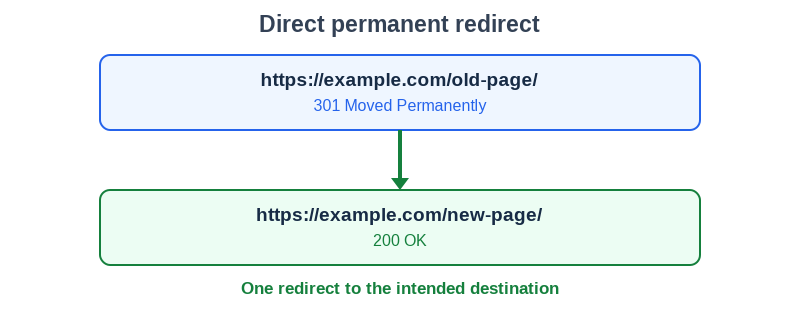
In this example, the original address returns a 301 permanent redirect, and the destination returns a 200 OK response. Only one redirect is required to reach the replacement page.
This is generally the preferred configuration when permanently changing a webpage's address.
A direct redirect minimizes unnecessary network requests, simplifies website maintenance, and makes the intended destination easier to identify.
Example 2: An Unnecessary Redirect Chain
Redirect chains occur when one URL redirects to another address that issues an additional redirect.
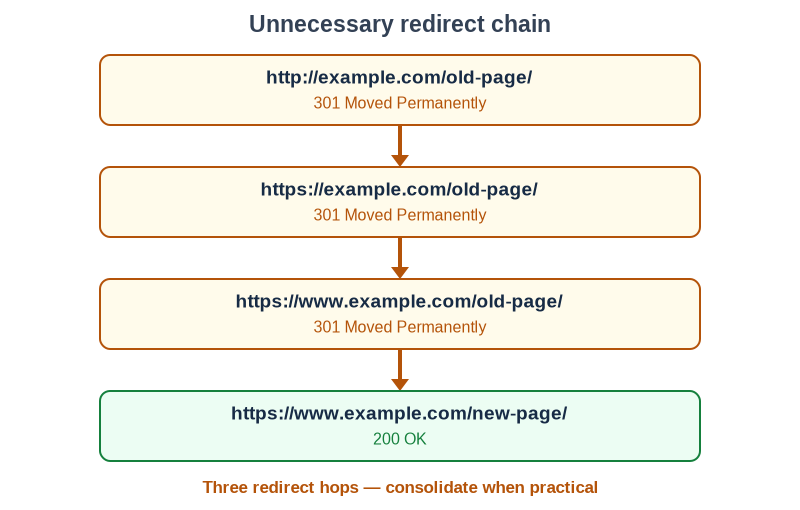
In this example, separate redirect rules handle the HTTPS protocol, preferred www hostname, and updated webpage path.
Although the final destination loads successfully, three redirects are required. Each additional request can increase latency and create another opportunity for configuration problems.
Whenever practical, configure the original address to redirect directly to its intended final destination.
Redirect chains frequently develop over time as websites undergo multiple redesigns, domain changes, and server configuration updates.
Example 3: A Redirect Loop
A redirect loop occurs when a webpage redirects back to itself or to an address that has already been visited.
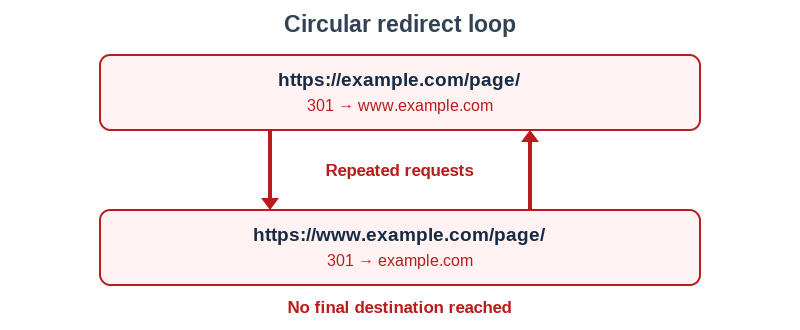
For example, a web server may be configured to add www to every hostname, while a content management system is configured to remove www.
These conflicting rules cause the request to move repeatedly between the two addresses.
The HTTP Redirect Checker tracks previously visited URLs and reports detected redirect loops while preserving the recorded redirect path. This makes it easier to identify the addresses involved in the problem.
Redirect loops should be corrected promptly because they can prevent visitors and automated crawlers from reaching website content.
Example 4: Consistent HTTP, HTTPS, WWW and Non-WWW Routing
A consistent website routing strategy directs alternative versions of a URL to the same preferred address.
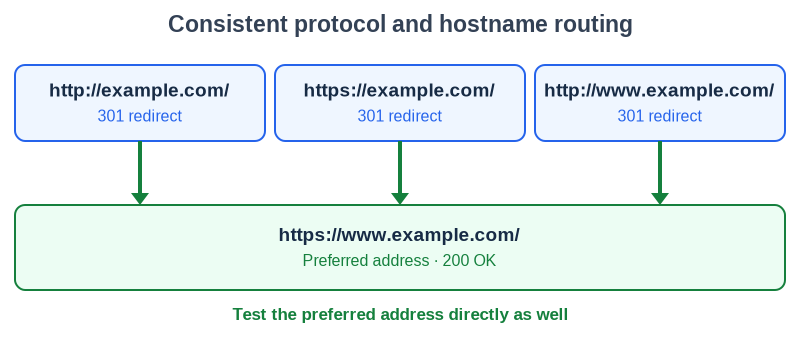
In this example, the website uses HTTPS and www as its preferred configuration. Each alternative address redirects directly to the preferred URL.
The automatic URL variation testing feature allows you to examine these configurations without manually entering all four addresses.
Consistent routing should also be reflected in internal links, XML sitemaps, and canonical declarations.
Example 5: Inconsistent Redirect and Canonical Destinations
A successful redirect does not necessarily mean that the destination's SEO configuration is correct.
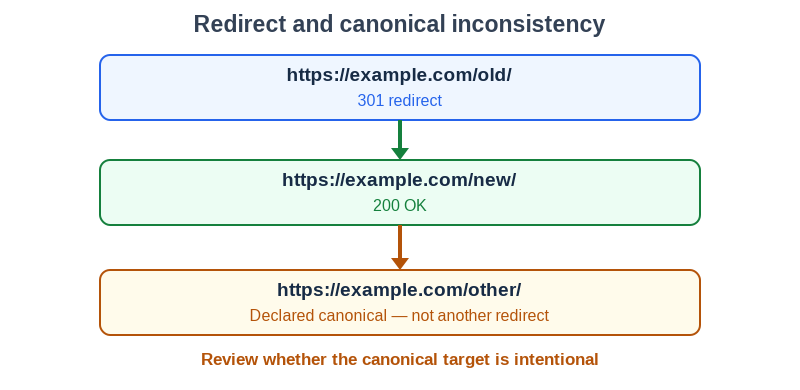
In this example, an outdated webpage redirects to a replacement page that returns a 200 OK response. However, the replacement page contains a canonical declaration pointing to a different URL.
This may be intentional when consolidating duplicate content. However, it can also indicate an outdated canonical tag, incorrect website template, or inconsistent migration strategy.
The HTTP Redirect Checker examines canonical declarations at the final destination, helping you identify these potential inconsistencies.
Use our Canonical URL Checker for additional canonical analysis.
Analyzing the SEO Configuration of Redirect Destinations
A redirect can be technically successful while still leading to a webpage with SEO problems. Reaching a destination that returns a 200 OK response is only one part of verifying a properly configured redirect.
Our HTTP Redirect Checker examines available canonical declarations and robots directives at the final destination to help identify potential inconsistencies.
HTML Canonical Tags
A canonical tag communicates which URL should be considered the preferred representative of a webpage's content.
After a permanent redirect, the destination will often contain a self-referencing canonical tag identifying its own preferred address.
However, outdated website templates, incorrect CMS settings, and incomplete website migrations can result in canonical declarations pointing to old or unintended URLs.
Review the canonical information reported by the checker to determine whether it supports your intended URL strategy.
HTTP Canonical Headers
Canonical declarations can also be communicated through the HTTP Link response header.
This is particularly useful for non-HTML resources, including PDF documents, where an HTML canonical tag cannot be inserted.
When both an HTML canonical tag and an HTTP canonical header are present, verify that their declarations are consistent.
Robots Meta Tags and X-Robots-Tag Headers
Robots directives communicate instructions to supporting search engine crawlers concerning indexing and other search-related behavior.
A redirect destination containing a noindex directive may be inappropriate if the replacement page is intended to appear in search results.
This problem sometimes occurs when a website is moved from a development environment to a production server without removing development-related indexing restrictions.
The checker examines available general robots directives, selected crawler-specific meta tags, and X-Robots-Tag response headers.
Remember that a noindex directive may apply only to a particular crawler. Its presence is not necessarily an error.
Maintaining Consistent SEO Signals
For webpages intended to appear in search results, verify that your website's redirect rules, canonical declarations, XML sitemaps, internal links, and indexing directives support the same intended destination.
Use our Website Meta Tags Analyzer, Canonical URL Checker, and XML Sitemap Validator to investigate these additional technical SEO signals.
Advanced HTTP Redirect Diagnostics
Modern websites often rely on multiple layers of technology to manage incoming requests. Web servers, content delivery networks, load balancers, application frameworks, and content management systems may all influence how a URL is handled.
The HTTP Redirect Checker provides additional diagnostic information to help developers investigate these configurations.
HTTPS Downgrade Detection
An HTTPS downgrade occurs when a secure URL redirects to an insecure HTTP address.
This can happen because of outdated redirect rules, incorrect application settings, reverse proxy configurations, or hardcoded destination URLs.
Websites should generally maintain HTTPS throughout the redirect process.
The checker identifies HTTPS-to-HTTP transitions so that developers can investigate unexpected protocol changes.
Hostname Changes
Redirects may intentionally send visitors to a different hostname or domain. Common examples include domain migrations, www and non-www normalization, and redirects to specialized application subdomains.
However, unexpected hostname changes can indicate incorrect configuration or unauthorized website modifications.
The checker highlights hostname changes throughout the redirect path, allowing you to verify that each transition is intentional.
Query String Changes
Query strings are commonly used for advertising attribution, analytics tracking, product filtering, pagination, and application functionality.
For example:
https://example.com/products/?utm_source=email
If a redirect removes or modifies the query string, marketing attribution or application behavior may be affected.
The checker compares query strings between consecutive URLs and reports detected changes.
Not every query string change is undesirable. Some websites intentionally remove obsolete tracking parameters or normalize URL variations. Evaluate these changes according to the intended behavior of the application.
Redirect Response Timing
Every additional redirect can introduce another network request before the destination is reached.
The checker reports the measured time for each recorded HTTP request and the combined request time for the redirect path.
This information helps identify slow responses and unnecessary intermediate requests.
These measurements are not equivalent to complete browser page load times or Core Web Vitals measurements. They reflect requests made by the redirect analysis server.
Missing or Ambiguous Location Headers
HTTP redirect responses normally include a Location header identifying the destination.
A missing Location header or multiple ambiguous Location headers can prevent the checker from determining the next address.
If this problem occurs, inspect the web server, CDN, or application responsible for generating the redirect response.
HTTP Redirects, Meta Refresh and JavaScript Redirects
Not all website redirects are implemented using HTTP status codes. Some websites instruct the browser to navigate to another address after the original webpage has been received.
Understanding the differences between server-side and client-side redirects is important when investigating website routing and SEO problems.
Server-Side HTTP Redirects
Server-side redirects are communicated through HTTP responses, typically using status codes such as 301, 302, 303, 307, or 308.
The server provides a Location header identifying the next address. Supporting clients can follow the redirect without rendering the original webpage.
Server-side redirects are generally preferred for permanent URL changes and website migrations.
HTML Meta Refresh Redirects
An HTML meta refresh element can instruct a browser to navigate to another URL immediately or after a specified delay.
Unlike a traditional HTTP redirect, the original webpage may return a 200 OK response before the browser processes the refresh instruction.
Our HTTP Redirect Checker examines available destination HTML for meta refresh instructions. It also reports HTTP Refresh headers when present.
JavaScript Redirects
Websites can use JavaScript to navigate visitors to another address.
These redirects may depend on browser capabilities, user interactions, authentication, cookies, geographic location, or application logic.
A conventional HTTP request may not reveal the final destination of a JavaScript-based redirect.
The HTTP Redirect Checker examines the retrieved destination content for possible JavaScript navigation instructions. When a potential instruction is detected, the tool recommends further browser-based investigation.
JavaScript is not executed by the checker, so dynamically generated or conditional redirects may not be detected. Some detected instructions may also represent code that never executes.
Which Redirect Method Is Best for SEO?
For permanent webpage moves, a properly configured server-side permanent redirect is generally the preferred approach.
Client-side redirects may be appropriate for certain application requirements, but they should not unnecessarily complicate access to important website content.
For more information, review Google's documentation on Redirects and Google Search and MDN's guide to Redirections in HTTP.
Common HTTP Redirect Mistakes to Avoid
Redirect problems often develop gradually as websites are updated, redesigned, and moved between hosting environments.
Even websites that appear to function correctly in a browser may contain unnecessary redirects or inconsistent server configurations.
Using Temporary Redirects for Permanent URL Changes
If a webpage has permanently moved, use an appropriate permanent redirect status code rather than a temporary redirect.
Temporary redirects communicate a different intention and may not provide the same canonicalization signals to search engines.
Creating Unnecessary Redirect Chains
Avoid creating additional redirects when an existing redirected URL changes again.
Where practical, update older redirect rules to point directly to the current replacement page.
Redirecting Every Removed Page to the Homepage
Redirecting unrelated or discontinued webpages to the homepage can create a poor user experience.
Search engines may also interpret irrelevant redirects as soft 404 errors.
Whenever possible, redirect outdated URLs to relevant replacement content. If no appropriate replacement exists, returning a 404 or 410 response may be more suitable.
Creating Conflicting Redirect Rules
Redirects may be configured in several places, including server configuration files, CDN dashboards, CMS settings, and application code.
Conflicting rules can create redirect loops, unnecessary intermediate requests, and inconsistent hostname or protocol behavior.
Review the entire request-handling process when troubleshooting these problems.
Forgetting to Update Internal Links
After changing a webpage's address, update internal links to point directly to the new destination.
Relying on redirects for routine internal navigation introduces unnecessary requests.
Leaving Outdated URLs in XML Sitemaps
XML sitemaps should generally contain preferred, indexable canonical URLs rather than outdated addresses that redirect elsewhere.
Update your sitemap following website migrations and URL restructuring.
Use our XML Sitemap Generator to help create an updated sitemap.
Losing Important Query Parameters
Redirect configurations may unintentionally remove tracking parameters, product filters, pagination values, or application-specific information.
Test representative URLs containing query strings to verify that important parameters are preserved when necessary.
Ignoring the Final Destination's SEO Configuration
A successful HTTP redirect does not guarantee that the replacement webpage is correctly configured.
Always review the final HTTP response, canonical declarations, robots directives, and relevance of the destination content.
Using a Bulk Redirect Checker During Website Migrations
Website redesigns, domain changes, CMS migrations, and URL restructuring can introduce significant technical SEO problems when redirects are not implemented correctly.
Established webpages may have valuable backlinks, search visibility, bookmarks, and links from other websites. When their addresses change, a properly planned redirect strategy helps maintain access to their replacement content.
Before Launching a Website Migration
Create an inventory of existing URLs and identify the appropriate replacement address for each webpage.
Whenever possible, map old URLs to relevant replacement pages rather than redirecting every outdated address to the homepage.
Review your planned redirect rules, preferred hostname, HTTPS configuration, canonical declarations, and XML sitemap.
After Launching a Website Migration
Use the bulk HTTP Redirect Checker to test representative groups of old URLs.
Verify that each address:
- Returns the intended redirect status code.
- Reaches the appropriate replacement page.
- Avoids unnecessary intermediate redirects.
- Does not encounter a redirect loop.
- Maintains HTTPS where appropriate.
- Preserves necessary query parameters.
- Returns the expected final HTTP status.
- Contains appropriate canonical declarations and robots directives.
Download CSV reports to document your findings and organize any required corrections.
Continue Monitoring After the Migration
Redirect problems may appear after subsequent website updates, changes to CDN settings, application deployments, or server configuration changes.
Periodically retest important historical URLs, particularly those receiving significant traffic or external links.
Use our Broken Link Checker to identify internal link problems.
Island Web Studios provides professional Website Maintenance, Full Stack Web Development, and Technical SEOservices to assist businesses with website migrations and ongoing technical improvements.
Exporting Redirect Analysis Results to CSV
The HTTP Redirect Checker includes a CSV export feature that allows you to save your redirect analysis results for further investigation, documentation, and reporting.
The downloadable report includes individual HTTP request records rather than simply listing the final destination of each submitted URL.
Information Included in the CSV Report
| Column | Description |
|---|---|
| Input | The original address being analyzed. |
| Hop | The position of the request within the redirect path. |
| URL | The address requested at that step. |
| Status | The HTTP status code returned. |
| Location | The redirect destination reported in the Location header. |
| Milliseconds | The measured HTTP request time. |
| Final URL | The final destination, when reached. |
| Warnings | Diagnostic findings associated with the analysis. |
| Error | Any reported analysis error. |
| Canonical | Available final destination canonical declarations. |
| Robots | Available final destination robots directives. |
Using CSV Reports for Technical SEO Audits
Exported reports can be opened in spreadsheet applications such as Microsoft Excel and Google Sheets.
Developers and SEO professionals can use these reports to identify URLs requiring correction, compare results before and after website updates, document migration progress, and communicate technical findings to other team members.
For larger projects, analyze URLs in separate batches and combine the exported reports into a master spreadsheet.
The CSV export contains the principal analysis findings. Complete response headers remain available in the interactive results interface.
How HTTP Redirects Affect SEO, AEO and GEO
A technically sound website must allow visitors, search engines, and AI-powered retrieval systems to reach its content reliably.
Proper redirect management is an important part of maintaining that accessibility, particularly when webpages are moved, updated, consolidated, or replaced.
HTTP Redirects and Search Engine Optimization (SEO)
Search engines use redirects as part of their process for discovering content and determining preferred URLs.
Permanent redirects can communicate that a resource has moved to a different address and help search engines consolidate signals associated with old and replacement URLs.
However, redirect chains, circular redirects, broken destinations, and inconsistent canonical declarations can complicate this process.
A successful technical SEO strategy should include:
- Appropriate permanent and temporary redirect status codes.
- Direct redirects to relevant destinations.
- Consistent HTTPS and hostname configurations.
- Accurate canonical declarations.
- Appropriate robots directives.
- Updated internal links and XML sitemaps.
Our HTTP Redirect Checker helps investigate these technical factors from a single interface.
HTTP Redirects and Answer Engine Optimization (AEO)
Answer engines retrieve information from websites, search indexes, and other data sources to provide direct responses to user questions.
When an answer engine encounters an outdated URL, a properly configured redirect can help it reach the current version of the information.
Broken redirects, inaccessible destinations, and conflicting website configurations may interfere with content retrieval.
Maintaining reliable redirect paths should be combined with descriptive headings, accurate metadata, useful educational content, and appropriate structured data.
HTTP Redirects and Generative Engine Optimization (GEO)
Generative search platforms may discover website content through their own crawlers, traditional search providers, third-party indexes, or direct retrieval.
Consistent URL management helps maintain access to resources when websites are redesigned or content is reorganized.
This is particularly important for established articles, educational resources, service pages, and product information that may already be referenced by other websites.
Proper redirect configuration supports technical accessibility but does not guarantee that a website will be cited or recommended in an AI-generated answer.
Combining Redirect Analysis With Other Optimization Tools
Redirect management is only one component of a comprehensive website optimization strategy.
Use our HTML Heading Structure Checker, Website Meta Tags Analyzer, Canonical URL Checker, and Schema Markup Generator to investigate other important aspects of website optimization.
Island Web Studios offers professional SEO, AEO and GEO services to help businesses improve their visibility across traditional search engines and emerging AI-powered search technologies.
Understanding the Limitations of HTTP Redirect Analysis
Our HTTP Redirect Checker is designed to provide detailed diagnostic information while maintaining reasonable server resource and security limits.
Analysis Limits
The tool supports up to five manually submitted URLs per batch and up to eight distinct URLs when automatic variation testing is enabled.
Each batch is limited to 24 outbound HTTP requests, with up to eight followed redirects per URL. Additional execution-time and response-size limits help prevent excessively large or prolonged requests.
Long redirect chains or slow server responses may cause some analyses to remain incomplete. If this occurs, repeat the analysis with fewer URLs.
Publicly Accessible Websites
The checker supports publicly accessible HTTP and HTTPS addresses using standard web ports.
Private network addresses, local development servers, unsupported ports, and certain other destinations are restricted for security reasons. IPv6-only destinations are not currently supported.
Some websites may block automated requests through firewalls, bot protection services, or rate-limiting systems. These restrictions can cause the checker to receive different responses than a conventional web browser.
Browser-Specific Behavior
The tool does not render webpages or execute JavaScript.
Redirects that depend on browser cookies, authentication, geographic location, user interactions, or dynamically executed JavaScript may behave differently in a browser.
HTML meta refresh instructions and possible JavaScript redirects are reported for further investigation rather than automatically executed.
Metadata Inspection Limits
Canonical and robots analysis is based on available response headers and retrieved destination content.
Large responses may be truncated, resulting in incomplete metadata inspection.
Relative canonical URLs that depend on an HTML base element may require additional manual verification.
Response Timing
Reported response times reflect HTTP requests made by the analysis server. They do not measure complete webpage rendering, JavaScript execution, resource loading, or the experience of every website visitor.
Diagnostic Recommendations
Warnings identify conditions that may require investigation. They do not necessarily indicate incorrect website behavior.
A hostname change, query string modification, temporary redirect, or non-self-referencing canonical declaration may be entirely appropriate for a particular website.
The HTTP Redirect Checker is a diagnostic resource rather than a complete technical SEO audit or a guarantee of search engine indexing.
Frequently Asked Questions About HTTP Redirects
What is an HTTP redirect checker?
An HTTP redirect checker examines the responses returned when a website URL is requested. It identifies HTTP redirect status codes, intermediate destinations, redirect chains, and final responses. The Island Web Studios HTTP Redirect Checker also provides response header inspection, destination SEO analysis, diagnostic warnings, and CSV reporting.
Is the HTTP Redirect Checker free?
Yes. The Island Web Studios HTTP Redirect Checker is a free online tool for analyzing individual URLs, small batches of URLs, redirect chains, HTTP status codes, response headers, and final destination SEO signals.
Can I check multiple URLs at the same time?
Yes. Enter up to five URLs in the Website URLs field, placing each address on a separate line. Each address receives its own analysis results, including the recorded redirect path and diagnostic findings.
How many URLs can the bulk redirect checker analyze?
You can submit up to five URLs per batch. When automatic URL variation testing is enabled, the tool can analyze up to eight distinct addresses, subject to its overall request and execution limits.
Can I automatically test HTTP, HTTPS, www and non-www versions of a URL?
Yes. Enable the automatic URL variation testing option before running the analysis. The checker generates alternative protocol and hostname combinations and provides separate results for the addresses tested within the batch limits.
Is www or non-www better for SEO?
Neither www nor non-www is inherently better for SEO. Choose a preferred hostname and maintain consistency across redirects, canonical declarations, internal links, and XML sitemaps.
What is the difference between a 301 and a 302 redirect?
A 301 redirect indicates that a resource has permanently moved to another address. A 302 redirect indicates that the resource is temporarily available at another address. Choose the status code that accurately represents the intended behavior.
What is a 303 redirect?
A 303 See Other response directs the client to retrieve another resource, commonly using a GET request after submitting a form. It is frequently used in web applications to avoid repeating a form submission when a page is refreshed.
What is the difference between a 307 and a 308 redirect?
A 307 is a temporary redirect, while a 308 is a permanent redirect. Both preserve the original HTTP request method when followed automatically. This distinction can be important for web applications that process POST requests and other HTTP methods.
What is a redirect chain?
A redirect chain occurs when a URL redirects to another address that issues an additional redirect. Multiple requests may be required before the final destination is reached.
How many redirects are too many?
There is no universal number of redirects that is appropriate for every website. However, unnecessary intermediate redirects should be eliminated whenever practical. A direct redirect to the intended final destination is generally preferable.
What is a redirect loop?
A redirect loop occurs when a URL redirects back to itself or to a previously visited address. The request cannot reach a normal final destination and may continue until the client detects the loop or reaches its redirect limit.
Does the HTTP Redirect Checker detect redirect loops?
Yes. The checker tracks previously visited URLs during the HTTP redirect analysis. When a repeated URL is detected, the tool reports a redirect loop and retains the recorded redirect path for investigation.
What causes redirect loops?
Common causes include conflicting web server rules, CDN configurations, CMS settings, HTTPS enforcement, hostname normalization, and application-level redirects. Investigate each technology involved in processing the affected URL.
Can redirects hurt SEO?
Properly configured redirects are a normal part of website maintenance and migrations. However, redirect loops, broken destinations, unnecessary redirect chains, and irrelevant destination pages can create problems for visitors and search engine crawlers.
Can redirects slow down my website?
Yes. Each additional HTTP redirect can introduce another network request. Unnecessary redirect chains can increase the time required to reach the intended webpage, particularly on slower network connections.
Does the checker measure redirect response times?
Yes. The tool displays the measured HTTP request time for each recorded step and the combined request time for the redirect path. These measurements do not represent complete browser page load times.
What does a final HTTP status code of 200 mean?
A 200 OK response indicates that the server successfully handled the HTTP request. It does not guarantee that the returned content is correct, accessible, error-free, or eligible for search engine indexing.
Can I inspect HTTP response headers for each redirect?
Yes. Expand the Response Headers section beneath a recorded step to inspect available HTTP response headers. These may include Location, Content-Type, Cache-Control, Link, X-Robots-Tag, and security-related headers.
What is an HTTPS downgrade?
An HTTPS downgrade occurs when a secure HTTPS address redirects to an insecure HTTP address. The checker highlights these transitions so developers can investigate whether the behavior is intentional.
Does the checker identify redirects to another domain?
The checker reports hostname changes between consecutive URLs. This includes changes between www and non-www addresses, subdomains, and different domains. Review the reported hostnames to determine whether the transition is appropriate.
Can redirects remove tracking parameters?
Yes. Depending on the redirect configuration, query strings containing tracking parameters, product filters, or application data may be removed or modified. The checker reports changes to query strings so that developers can investigate potential problems.
Does the HTTP Redirect Checker analyze canonical tags?
Yes. When a final response is reached, the tool examines available HTML canonical declarations and HTTP Link headers. This helps identify potential inconsistencies between the final destination and its declared canonical URL.
What is the difference between a redirect and a canonical tag?
A redirect instructs a client to request another URL. A canonical tag communicates a preferred representative URL without necessarily preventing access to the original webpage.
Does the checker detect noindex directives?
Yes. The tool examines available general robots meta tags, selected crawler-specific robots meta tags, and X-Robots-Tag headers. It highlights detected noindex directives for further investigation. The presence of a noindex directive may be intentional or limited to a particular crawler.
Does the checker detect HTML meta refresh redirects?
Yes. The tool examines available destination HTML for meta refresh instructions and reports HTTP Refresh headers when present. These instructions are reported for investigation rather than automatically followed.
Does the HTTP Redirect Checker detect JavaScript redirects?
The checker can identify possible JavaScript navigation instructions in retrieved destination content. It does not execute JavaScript, so conditional, dynamically generated, or externally loaded redirect behavior may require separate browser-based testing.
Can I download my redirect analysis results?
Yes. Click Download CSV after completing an analysis to export the recorded URLs, redirect steps, HTTP status codes, Location headers, response times, final destinations, warnings, errors, canonical declarations, and robots information.
Why might my browser show different redirect results?
Redirect behavior may vary according to cookies, authentication, cached responses, browser settings, geographic location, request headers, CDN configuration, and automated request restrictions. JavaScript-based navigation can also produce different results in a web browser.
Should redirected URLs appear in my XML sitemap?
Generally, XML sitemaps should contain preferred, indexable canonical URLs rather than addresses that redirect to another destination. Update your sitemap when permanently changing webpage addresses.
Should internal links point to redirected URLs?
Whenever practical, internal links should point directly to their intended final destinations. This avoids unnecessary redirect requests and supports consistent website navigation and URL management.
Is a redirect checker the same as a broken link checker?
No. A redirect checker analyzes submitted URLs and their redirect paths. A broken link checker discovers and evaluates links found within webpages or groups of webpages. Both tools are useful when conducting technical SEO audits.
Can I use the HTTP Redirect Checker during a website migration?
Yes. The tool is particularly useful for testing old URLs, verifying replacement destinations, comparing hostname and protocol variations, detecting redirect loops, and reviewing destination SEO signals. CSV reports can help document migration findings.
Why did the redirect analysis stop before reaching a destination?
The analysis may stop because of a redirect loop, invalid destination, server error, request timeout, security restriction, redirect limit, or overall batch limit. Review the recorded results and error message. If necessary, repeat the test with fewer URLs.
Do HTTP redirects affect AI search engines?
Redirects can influence how automated retrieval systems discover and reach website content. Reliable redirect paths and consistent destination URLs support technical accessibility, but they do not guarantee inclusion or citation in AI-generated answers.
Related Free SEO and Website Development Tools
Island Web Studios provides a collection of free online tools designed to help website developers, SEO professionals, designers, and business owners create and maintain better websites.
- Canonical URL Checker – Examine canonical declarations and identify potential URL canonicalization problems.
- HTTP Headers Checker – Inspect HTTP response headers, server configuration, and security-related information.
- Broken Link Checker – Investigate broken links and inaccessible website resources.
- Website Meta Tags Analyzer – Examine webpage metadata, robots directives, and social media tags.
- XML Sitemap Validator – Validate XML sitemap structure and investigate potential sitemap problems.
- XML Sitemap Generator – Generate XML sitemaps for your website.
- Robots.txt Generator – Create, edit, and test crawler access rules.
- Schema Markup Generator – Create JSON-LD structured data for websites and online content.
- HTML Heading Structure Checker – Examine webpage heading hierarchy and identify potential content structure and accessibility problems.
Explore our complete collection of Free Website Development and SEO Tools.
Need Professional Technical SEO or Website Development Assistance?
Identifying redirect problems is only the first step. Correcting complex website routing, server configuration, canonicalization, and indexing problems often requires experience with multiple web development technologies.
With three decades of website development experience, Island Web Studios provides a one-stop solution for website design, full-stack development, website maintenance, and digital marketing.
Our Technical SEO services help businesses identify and resolve technical website problems, while our SEO, AEO and GEO services help improve visibility across traditional search engines and AI-powered search platforms.
Whether you are launching a new website, planning a website migration, or improving an existing website, we can help you develop a reliable and technically sound online presence.
Contact Island Web Studios to learn how we can help your business.
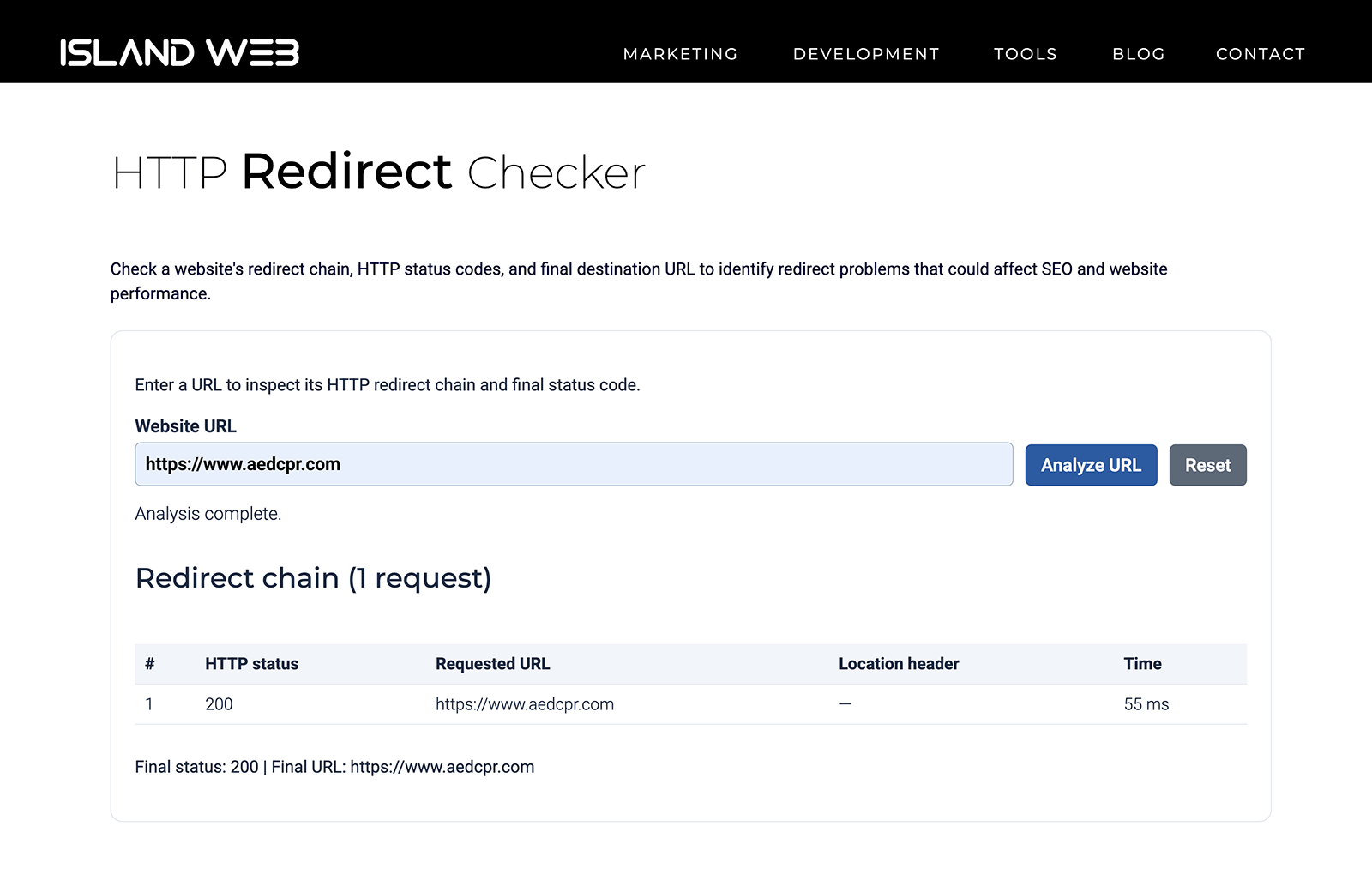
Analyze multiple website URLs, visualize redirect chains, inspect HTTP response headers, and investigate potential technical SEO problems with the free Island Web Studios HTTP Redirect Checker.